> For the complete documentation index, see [llms.txt](https://ce-docs.keywordrush.com/llms.txt). Markdown versions of documentation pages are available by appending `.md` to page URLs; this page is available as [Markdown](https://ce-docs.keywordrush.com/frontend/shops-and-coupons.md).
# Shops & coupons
Give a shop a display name, a logo, or a coupon that appears beside its offers.
Content Egg finds shops in your product data automatically. Every offer already knows which shop it came from, so **you never add a shop to make it work** — the Shops screen is where you customize one that is already there.
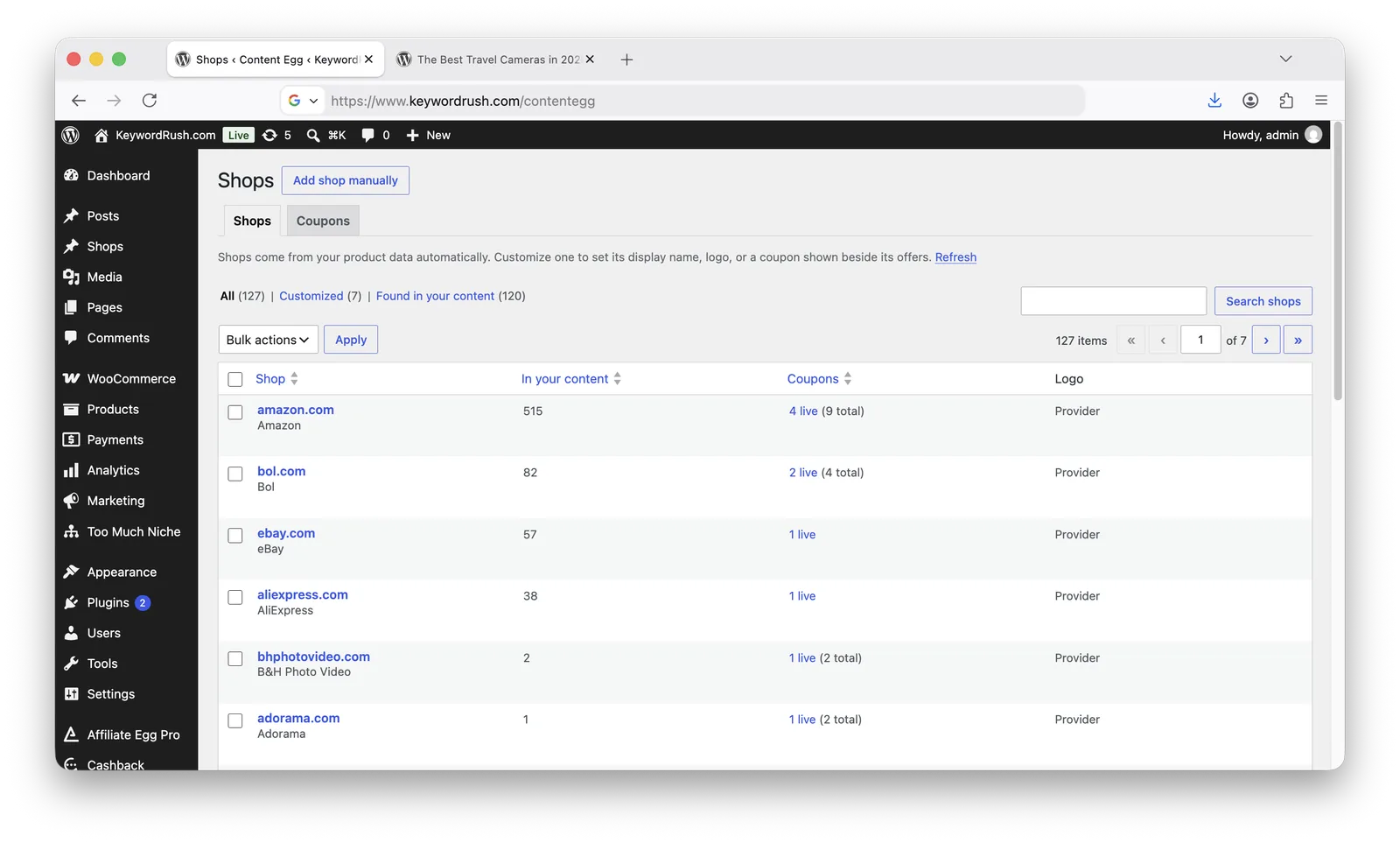
Open **Content Egg → Shops**.
Shops found in your content, busiest first
| Column | Meaning |
| ------------------- | --------------------------------------------------------------------------------------- |
| **Shop** | The shop's domain, and its display name underneath if you set one. |
| **In your content** | How many product rows this shop appears in. Higher numbers are worth customizing first. |
| **Coupons** | How many of this shop's coupons are live right now, and how many it has in total. |
| **Logo** | Whether the shop uses a logo you chose, or the logo provider. |
Shops are matched by **domain**, and matching ignores `www.` and any subdomain. You can paste a product URL into the domain field instead of typing the domain — both land on the same shop.
{% hint style="info" %}
The list is built from your most recent products, so a shop that only appears in much older posts may not be listed. Use **Add shop manually** for those. If the scan stopped at its limit, the page says so and offers **Scan all**.
{% endhint %}
## Customizing a shop
Click a shop, or **Customize** on one that has not been set up yet.
* **Display name** — shown instead of the domain in templates and by the `%MERCHANT%` tag.
* **Logo** — overrides the logo provider for this shop. Leave empty to keep using the provider. This is the fix when a provider stops returning a logo and a shop shows a blank space.
* **Shop info** — appears in the shop-info popup where a template enables it.
* **Coupons** — see below.
Renaming a shop's domain moves the record. If the new domain already belongs to another shop, the save is refused with a link to that shop, and nothing is overwritten.
## Adding a coupon
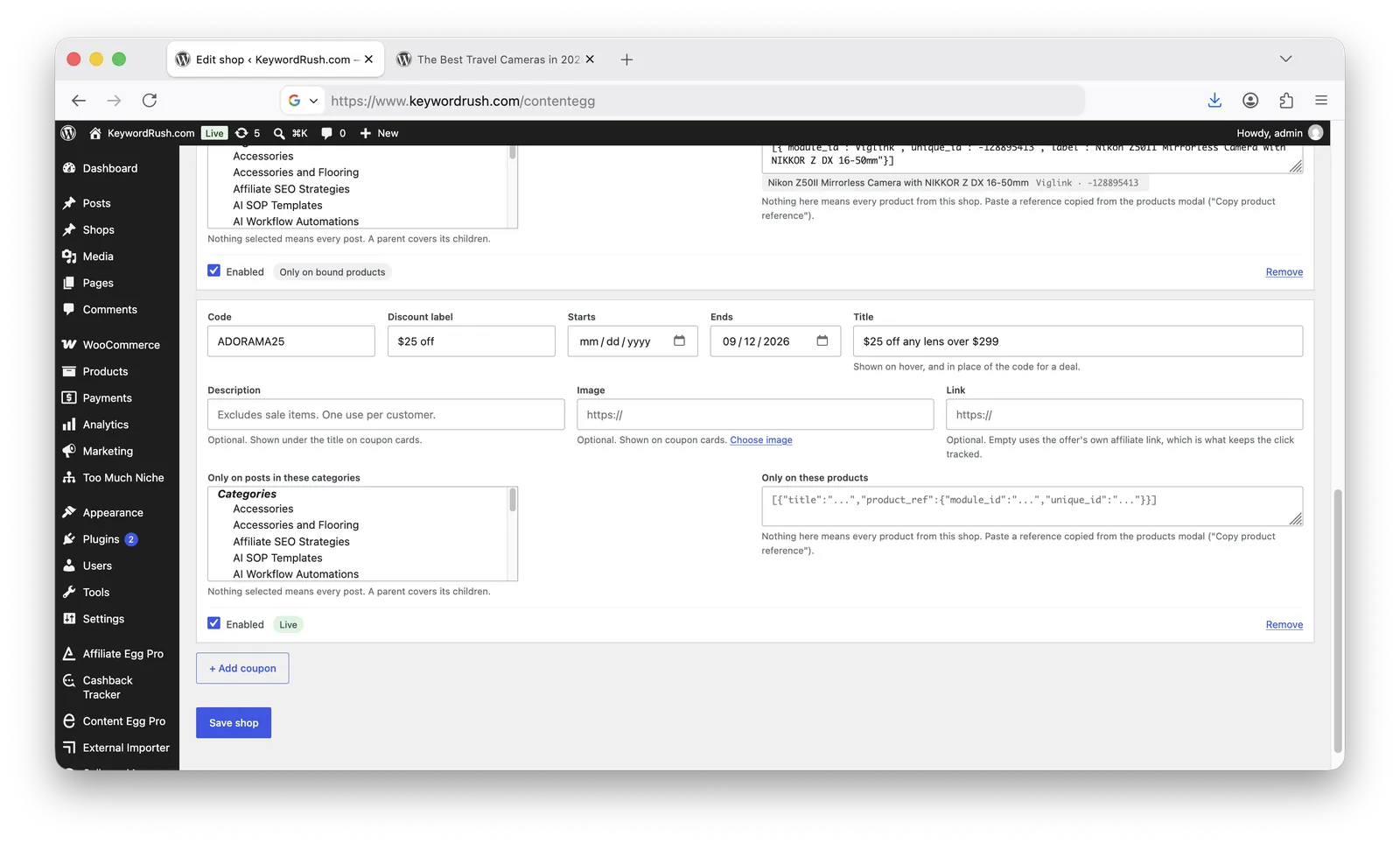
One coupon on a shop's edit screen
* **Code** — for example `10%SUMMER`. This is what a reader copies. Leave it empty for a *deal*: an offer that needs no code.
* **Discount label** — a short summary such as `10% off`, shown beside the code and as a badge on cards.
* **Starts / Ends** — leave empty for no limit. Dates are your site's dates: a coupon ending 31 August works all day on 31 August.
* **Title** — what the offer is, for example `10% off video games`. Shown on hover over the chip, as the card's headline, and in place of the code for a deal.
* **Description** — optional, longer. Shown on cards behind a **See details** toggle, so a long one does not make the list unreadable.
* **Image** — optional artwork for this offer, shown on cards. Use **Choose image** to pick one from your media library.
* **Link** — optional. Leave it empty and the coupon uses the offer's own affiliate link, which is what keeps the click tracked.
* **Only on posts in these categories** / **Only on these products** — where the coupon applies. See [Where a coupon applies](#where-a-coupon-applies).
* **Enabled** — turn a coupon off without deleting it.
Every coupon row shows its own state, which is the fastest way to answer "why isn't my coupon showing":
| State | Meaning |
| ---------------------------------------------- | ------------------------------------------------------------------------- |
| **Live** | Enabled, in date, and rendering. |
| **Scheduled** | Its start date has not arrived yet. |
| **Expired** | Its end date has passed. |
| **Disabled** | The Enabled box is unchecked. |
| **Only on bound products** | Live, but limited to specific products, so it appears only where they do. |
| **No code — hidden by the codes-only setting** | It has no code, and Content Egg is set to show codes only. |
**Content Egg → Shops → Coupons** lists every coupon across every shop, soonest to expire first, so you can see what needs attention without opening each shop.
## How coupons appear
There are four ways a coupon can show up in a product block. Set the one you want in **Content Egg → Settings → Shops**, or per block with the `coupons_display` [shortcode parameter](#overriding-per-block).
| Placement | What the reader sees | Best for |
| --------------------------------------- | ------------------------------------------- | ------------------------------------------- |
| **Inside the offer row** *(default)* | A small chip beside the offer it belongs to | Short codes and discount labels |
| **In a strip above or below the block** | A row of chips of their own, aligned right | Templates with no room for a chip |
| **As coupon cards below the block** | A full card per coupon | Long titles, images, and deals with no code |
| **Not at all** | Nothing | Blocks where a coupon would distract |
### Inside the offer row
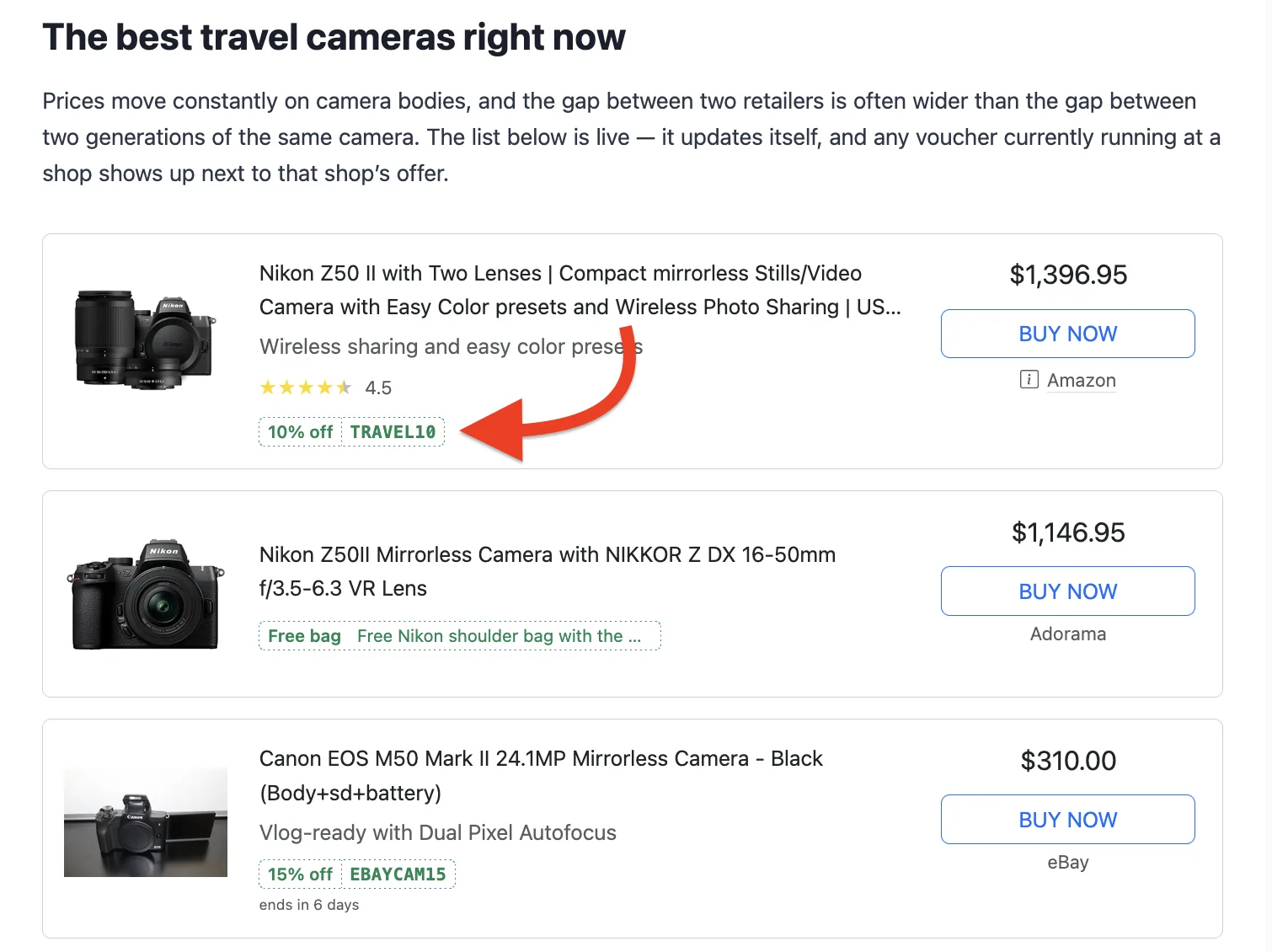
The coupon renders as a chip next to the offer from that shop:
A chip beside each shop's offer
One click **copies the code and opens the shop** — a single action for both jobs. An `ends in 4 days` line appears only when the end is close, and hovering shows the coupon's description, which is where a short chip cannot say what the offer applies to.
### In a strip above or below the block
Templates that have no space for a chip — and any template you copied into `content-egg-templates/` — do not show it inline. A strip puts the coupons in a row of their own instead, aligned right, above or below the block.
When the block contains products from **more than one shop**, each coupon in the strip is labelled with its shop so you can tell which offer it belongs to. When every product comes from the same shop the label would say nothing, so the space goes to the discount and the expiry instead.
{% hint style="info" %}
In strip mode a coupon is not tied to a single offer row, so clicks from the strip are not attributed to a specific product in Clicks statistics.
{% endhint %}
### As coupon cards below the block
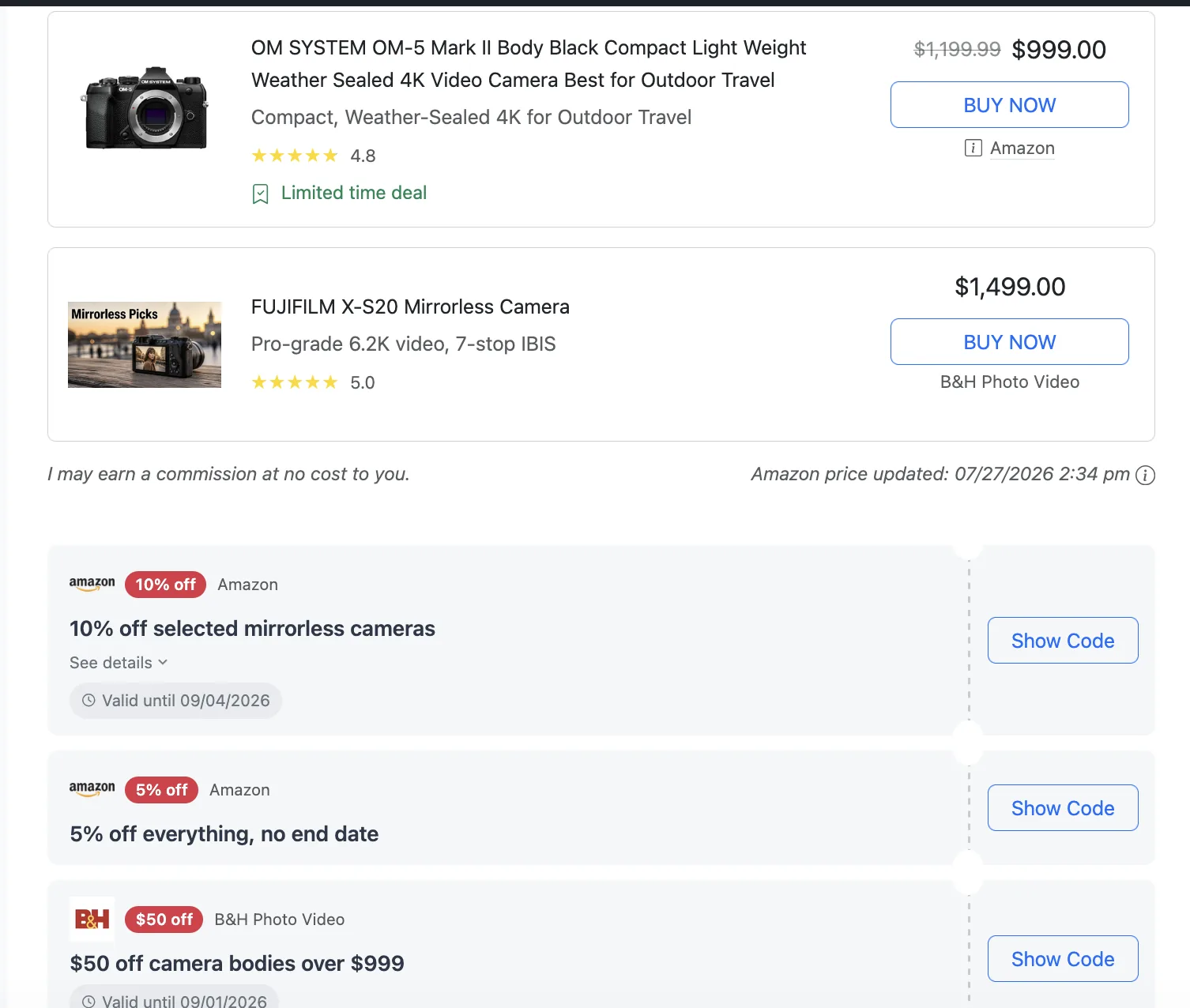
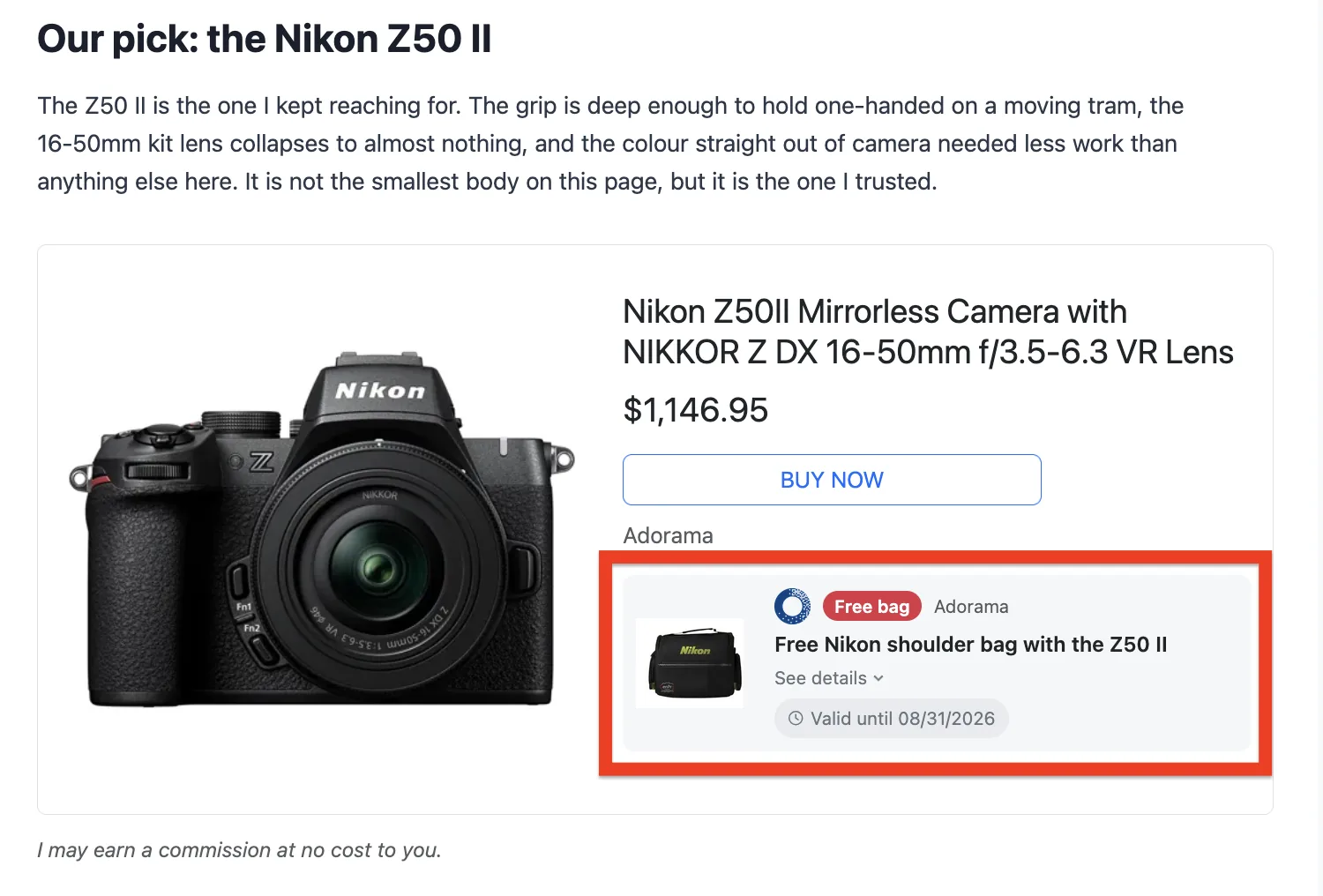
Each coupon becomes a full card rather than a chip. Use it when your coupons have more to say than a code — a long title, a description, an image, or no code at all.
Coupon cards below the block
{% hint style="info" %}
On a block showing **one product** with **one coupon**, the card moves inside the product card instead of sitting below it — where a single card below a single product reads as belonging to the page rather than to the product above it. A block with more than one product is unchanged, so a shop-wide coupon is said once rather than repeated in every row.
{% endhint %}
A card shows the coupon's image, its discount badge, the shop, the title, **See details** for the description, the end date, and either:
* **Show Code** — one click opens the shop *and* reveals the code, so the visit happens before the code is used. The code is copied to the clipboard at the same time, and clicking it again copies it once more.
* **Get deal** — for a coupon with no code, since there is nothing to copy.
{% hint style="info" %}
Cards are the right choice for coupons imported from an affiliate network. Those are mostly deals without codes, and their titles are usually far too long for a chip, so a chip would show a truncated sentence where a card shows the whole offer.
{% endhint %}
### Which coupon wins
When a shop has more than one coupon that applies:
1. Coupons bound to the product being shown, before shop-wide ones.
2. Coupons you entered, before coupons from another source.
3. Coupons targeted at the reader's category, before site-wide ones.
4. The order they appear on the shop's edit screen.
A coupon you typed also suppresses an identical code arriving from another source, so the same code never appears twice.
There is no "biggest discount first" rule, because a discount label is free text (`10%`, `10 EUR`, `up to 50%`) and cannot be compared reliably. Reorder the coupons on the shop to control which one leads.
## Where a coupon applies
By default a coupon applies to every post and every product from its shop. Two fields narrow that, and they can be combined.
### By category
A coupon with no categories applies to every post. Pick categories and it only appears on posts in them — a parent category covers its children, so choosing *Gaming* also covers *Gaming → Nintendo*.
Matching uses the categories of the **post the reader is on**, not the post the products were imported from. On a category archive, the archive's own category is used.
{% hint style="warning" %}
Post categories are a stand-in for product categories. A coupon valid only for video games is limited by putting it on your Gaming category — so a post filed in both Gaming and Movies will still show it. Choose categories that reflect where the coupon really applies.
{% endhint %}
Once you have selected categories, an **Apply to all categories** button appears next to the list; use it to clear the selection and make the coupon site-wide again.
### By product
Some offers belong to one product rather than to the shop — a free T-shirt with one vinyl record for two weeks, a case with a phone, a bonus item with a game. Those are not shop-wide vouchers, and showing them beside every offer from that shop would be wrong.
Bind the coupon to the product instead:
1. Open the post the product is on and open the products modal.
2. On the **Added** tab, open the product row's **⋮** menu and choose **Copy product reference**.
3. Open **Content Egg → Shops**, pick the shop, and paste it into the coupon's **Only on these products** box.
The row then shows what it understood — the product's name and its ids. If it shows nothing, the paste did not contain a reference, and the page says so when you save.
You can bind one coupon to several products: paste the references for each, or use **Copy all product references** to take every product on a post at once.
{% hint style="info" %}
The product must belong to **this shop**. A coupon on `thalia.de` bound to an Amazon product will never appear, because coupons are matched to offers by domain first. Content Egg warns you when you save one of these.
{% endhint %}
A bound coupon is not tied to the post you copied it from — it follows the product, so it appears wherever that product is listed. Set an end date and the offer retires itself when the promotion is over, with nothing to remember.
**It appears only with its product**, never beside the shop's other offers. In the **Product card** template it gets a card of its own inside the block, with room for a picture of the bonus item and a sentence explaining the offer:
A bonus bound to one product, inside that product's card
That card carries **no button of its own**. A bonus with no code sends the reader to the same place the product's own button does, so a second button would only repeat it. It does get one when it has somewhere else to send them: **Show Code** when the coupon has a code, or **Get deal** when you filled in the **Link** field.
In a strip or as a card below the block, a bound coupon is labelled with the **product's name** instead of the shop's, and links to that product.
## Settings
**Content Egg → Settings → Shops**:
| Setting | Default | Effect |
| -------------------------------------- | -------------------- | ------------------------------------------------------------------------------------------------------------------------------------------------------------- |
| **Coupons in product blocks** | Inside the offer row | Which of the four placements above to use. |
| **Which coupons in the row and strip** | Codes only | Whether coupons without a code (deals) appear there too. Coupon cards always show both. |
| **Coupons per shop** | 1 | How many coupons render beside one shop's offer. |
| **Show "ends in N days" within** | 7 | How close the end date must be before the expiry line appears. Set 0 to never show it. |
| **Cashback Tracker coupons** | Use them | Whether coupons imported by [Cashback Tracker](/integrations/cashback-tracker-integration.md) are shown alongside yours. Needs Cashback Tracker 3.0 or later. |
**Codes only** is the default on purpose. A deal with no code adds a line next to a buy button that already links to the shop, without giving the reader anything they could not get by clicking.
That reasoning does not apply to **coupon cards**, where a deal is the whole offer with its own title and button, nor to a coupon **bound to a product**, which describes that product rather than the shop. Both show regardless of this setting.
### Overriding per block
Both settings can be set on a single block, leaving the rest of the site alone:
```
[content-egg-block template=offers_list coupons_display=attached_before]
[content-egg-block template=offers_grid coupons_display=off]
[content-egg-block template=offers_list coupons_limit=3]
```
`coupons_display` accepts `inline`, `attached` (strip below the block), `attached_before` (strip above it), `cards` (coupon cards below it) and `off`. Leave it out to use the setting.
To suppress coupons in a block without naming a mode, `hide` also works:
```
[content-egg-block template=offers_list hide=coupons]
```
## Coupons from Cashback Tracker
If [Cashback Tracker](/integrations/cashback-tracker-integration.md) is installed, the coupons it imports from your affiliate networks appear beside the same shops, with no setup beyond leaving **Cashback Tracker coupons** switched on. Matching is by domain, the same as your own coupons.
Two things are worth knowing:
* **Links keep their tracking.** An imported coupon uses Cashback Tracker's own link, so a signed-in member's subid rides along and the click is credited to them.
* **Imported coupons apply to every post and every product that shop appears on.** They carry no WordPress categories and no product bindings, so both are things you set on your own coupons.
Your own coupons always come first, and a code you entered by hand suppresses an identical code arriving from Cashback Tracker, so the same code never appears twice.
{% hint style="warning" %}
Network coupon feeds are mostly deals without codes, and some entries are generic ("Home page", "Smart links") rather than a real offer. Use **coupon cards** to render them, and expect to leave the default of one coupon per shop rather than showing everything a network returns.
{% endhint %}
### Related
* [Customizing templates with CSS](/custom-templates/customizing-templates-with-css.md)
* [Shortcode parameters](/frontend/shortcode-parameters.md)
* [Cashback Tracker Integration](/integrations/cashback-tracker-integration.md)