> For the complete documentation index, see [llms.txt](https://ce-docs.keywordrush.com/llms.txt). Markdown versions of documentation pages are available by appending `.md` to page URLs; this page is available as [Markdown](https://ce-docs.keywordrush.com/integrations/cashback-tracker-integration.md).

# Cashback Tracker Integration

[Cashback Tracker](https://www.keywordrush.com/cashbacktracker) is a separate plugin from the same author. It runs a cashback programme: it imports shops and coupons from your affiliate networks, tracks what your members buy, and pays them a share.

With both plugins installed, the integration has two halves, and they are independent — you can use either one on its own.

* **Coupons.** The coupons Cashback Tracker imports appear beside the matching shops in your product blocks.
* **Member tracking.** Product links carry the signed-in member's tracking id, so what they buy is credited to their cashback account, and the rate can be shown beside the offer.

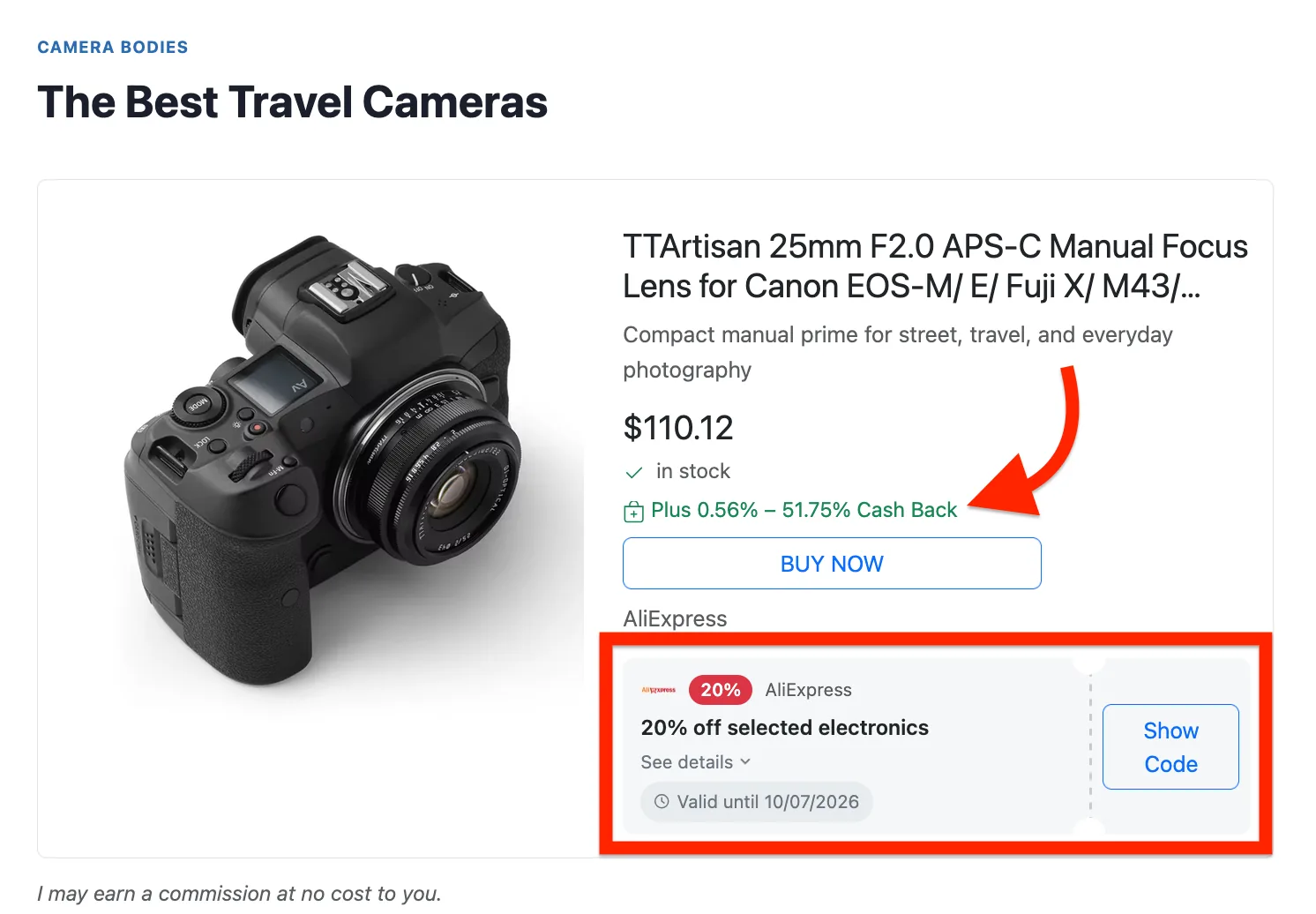
<figure><img src="https://4254262503-files.gitbook.io/~/files/v0/b/gitbook-x-prod.appspot.com/o/spaces%2F-M3fnB7iKYwDc1Xhr3H3%2Fuploads%2Fgit-blob-afe14b9e10043bc1d022050cc34988609edeb395%2Fcashback-rate-and-coupon.webp?alt=media" alt="A product card showing a green &#x22;Plus 0.56% – 51.75% Cash Back&#x22; line under the price, and a coupon card with a Show Code button below the Buy now button"><figcaption><p>Both halves on one product card: the member's rate under the price, and the shop's coupon beneath the offer</p></figcaption></figure>

## Coupons in product blocks

Cashback Tracker imports coupons from your affiliate networks. Those coupons appear beside the matching shops in your Content Egg product blocks — matched by domain, with no setup beyond leaving **Cashback Tracker coupons** switched on in **Content Egg → Settings → Shops**.

The link keeps Cashback Tracker's own tracking, so a signed-in member's subid rides along and the click is credited to them.

Your own coupons always come first, and a code you entered by hand suppresses an identical code arriving from Cashback Tracker, so the same code never appears twice.

See [Shops & coupons](/frontend/shops-and-coupons.md) for how coupons are matched, ranked and rendered.

{% hint style="info" %}
Network feeds are mostly deals without codes, and the default setting shows codes only. If your imported coupons are not appearing, that is usually why — switch **Which coupons in the row and strip** to codes and deals, or use **coupon cards**, which always show both.
{% endhint %}

## Member tracking and the cashback rate

Two settings in **Content Egg → Settings → General**:

| Setting                              | Default | What it does                                                                                                             |
| ------------------------------------ | ------- | ------------------------------------------------------------------------------------------------------------------------ |
| **Credit purchases to your members** | Enabled | Turns product links into Cashback Tracker's tracking links, so a purchase is credited to the signed-in member's account. |
| **Show the cashback rate**           | Enabled | Prints the rate beside the offer — "Plus 4.5% Cash Back".                                                                |

### Which links can be tracked

This is the part worth understanding before you promise anything to your members. Content Egg does the same two things Cashback Tracker's WooCommerce option does, in this order:

1. **The link already goes through one of your affiliate networks** — usually a link that came from an affiliate feed. The member's tracking id is added to it, and nothing else changes.
2. **The link points at a shop Cashback Tracker knows** — matched on the exact domain, against the shop list it imported from your networks. The link is **replaced** with Cashback Tracker's tracking link for that shop.

Step 2 is what makes the integration useful. Content Egg's feed and scraper modules mostly produce a plain merchant URL — an AliExpress product link is a bare `aliexpress.com` URL — and step 1 can do nothing with those.

A link to a shop Cashback Tracker does not have is left exactly as it is.

{% hint style="warning" %}
**Replacing a link moves the commission.** If a product link already carried your own affiliate ID and that shop is also in Cashback Tracker's list, the network link replaces it, and the commission goes through that network instead.

That is usually what you want on a cashback site — it is the only way the member can be credited. If it is not what you want, set **Credit purchases to your members** to Disabled and product links are left untouched.
{% endhint %}

Two details worth knowing:

* **Domains are matched exactly, with no normalising.** `aliexpress.com` and `s.click.aliexpress.com` are two different shops to Cashback Tracker, and only an exact match converts.
* **Visitors who are not signed in get the tracking link too**, without a member id on it. The click still earns you through the network; only the member's share is missing, which is what the rate wording says.
* **Cloaked links work.** If the module uses local redirects, the affiliate link behind the redirect is what gets converted, and the rate is read from it.

### What the rate says

The wording depends on who is reading, because only a signed-in member has an id to attach:

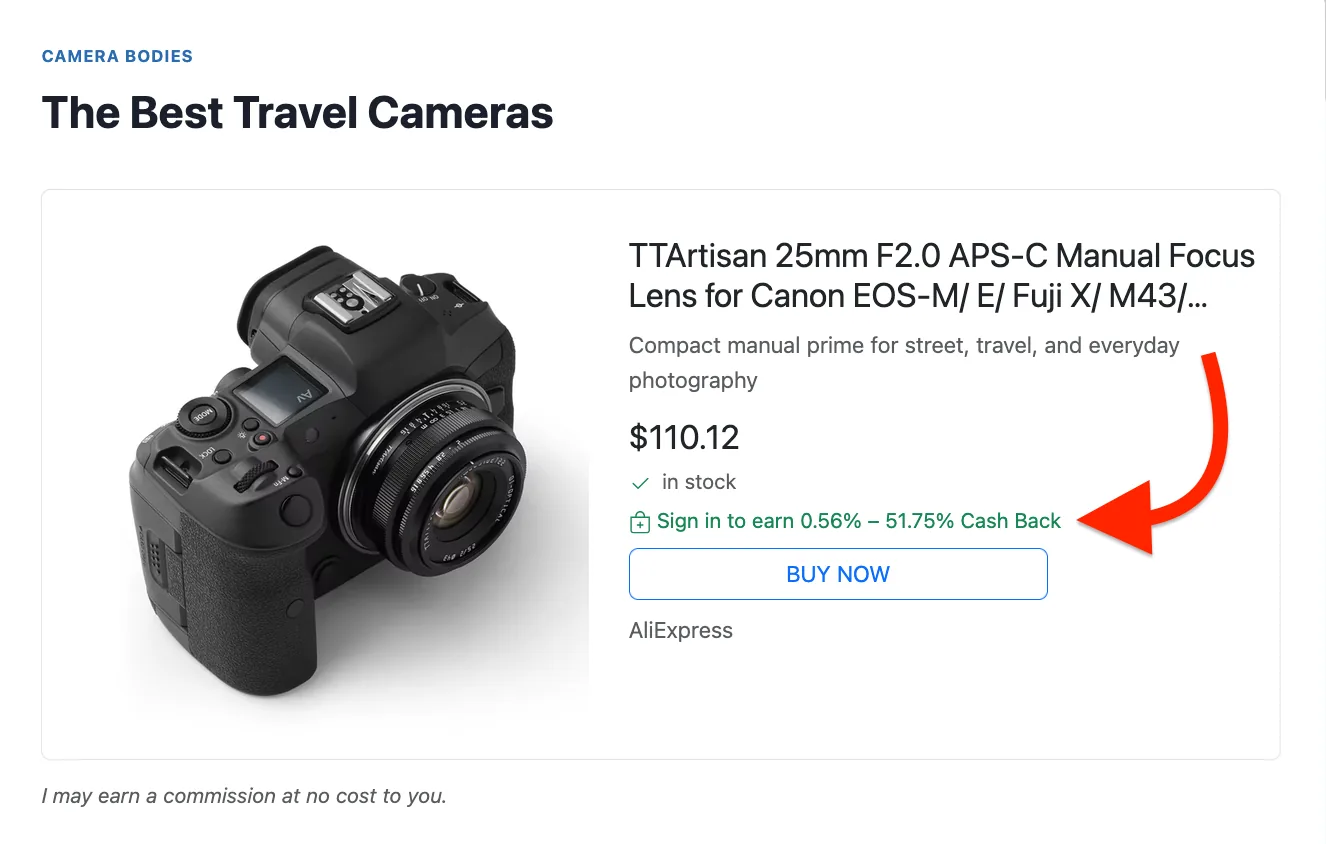
* **A signed-in member** sees `Plus 4.5% Cash Back`.
* **A visitor who is not signed in** sees `Sign in to earn 4.5% Cash Back`. Their click still earns you through the network, but there is no member account to credit, so the member's wording would be a promise nothing keeps.

<figure><img src="https://4254262503-files.gitbook.io/~/files/v0/b/gitbook-x-prod.appspot.com/o/spaces%2F-M3fnB7iKYwDc1Xhr3H3%2Fuploads%2Fgit-blob-6447e618b73cebcd6e8e322fd7c7f8613c277353%2Fcashback-rate-guest.webp?alt=media" alt="A product card showing the line &#x22;Sign in to earn 0.56% – 51.75% Cash Back&#x22; under the price"><figcaption><p>What a visitor who is not signed in sees, on a shop Cashback Tracker knows</p></figcaption></figure>

The rate is not shown at all when:

* the shop is not one Cashback Tracker has a rate for;
* Cashback Tracker is running with cashback features switched off (a coupon-only site);
* Cashback Tracker is set to **Credit the post author**, which sends every commission to you whoever is reading.

Both strings can be changed under **Content Egg → Settings → Frontend → Frontend Texts**.

### Where the rate appears

In every product template that shows a coupon chip — the large product card, offer rows, list rows and grid rows. To hide it in one block:

```
[content-egg-block template=offers_list hide=cashback]
```

## Related

* [Shops & coupons](/frontend/shops-and-coupons.md)
* [Content Egg](https://ctracker-docs.keywordrush.com/integrations/content-egg) in the Cashback Tracker documentation