> For the complete documentation index, see [llms.txt](https://ce-docs.keywordrush.com/llms.txt). Markdown versions of documentation pages are available by appending `.md` to page URLs; this page is available as [Markdown](https://ce-docs.keywordrush.com/modules/affiliate/allkeyshop.md).
# AllKeyShop module
Build a game price comparison site in WordPress with the Content Egg AllKeyShop module. Compare CD key prices across hundreds of stores through the AllKeyShop API, with coupon codes, regions and autom
The **AllKeyShop module** turns WordPress into a game key price comparison site. It reads the AllKeyShop catalogue — around 200,000 games, DLC, prepaid cards, in-game currency and software — and imports live offers from hundreds of key stores, each with its price, stock status, region, edition and discount code.
AllKeyShop compares prices for Steam, GOG, Epic, PlayStation, Xbox, Nintendo and Ubisoft keys, so a single search covers both PC and console titles.
#### What you can build
* **Single-product pages** — one product per game at its cheapest current price, alongside your other Content Egg modules.
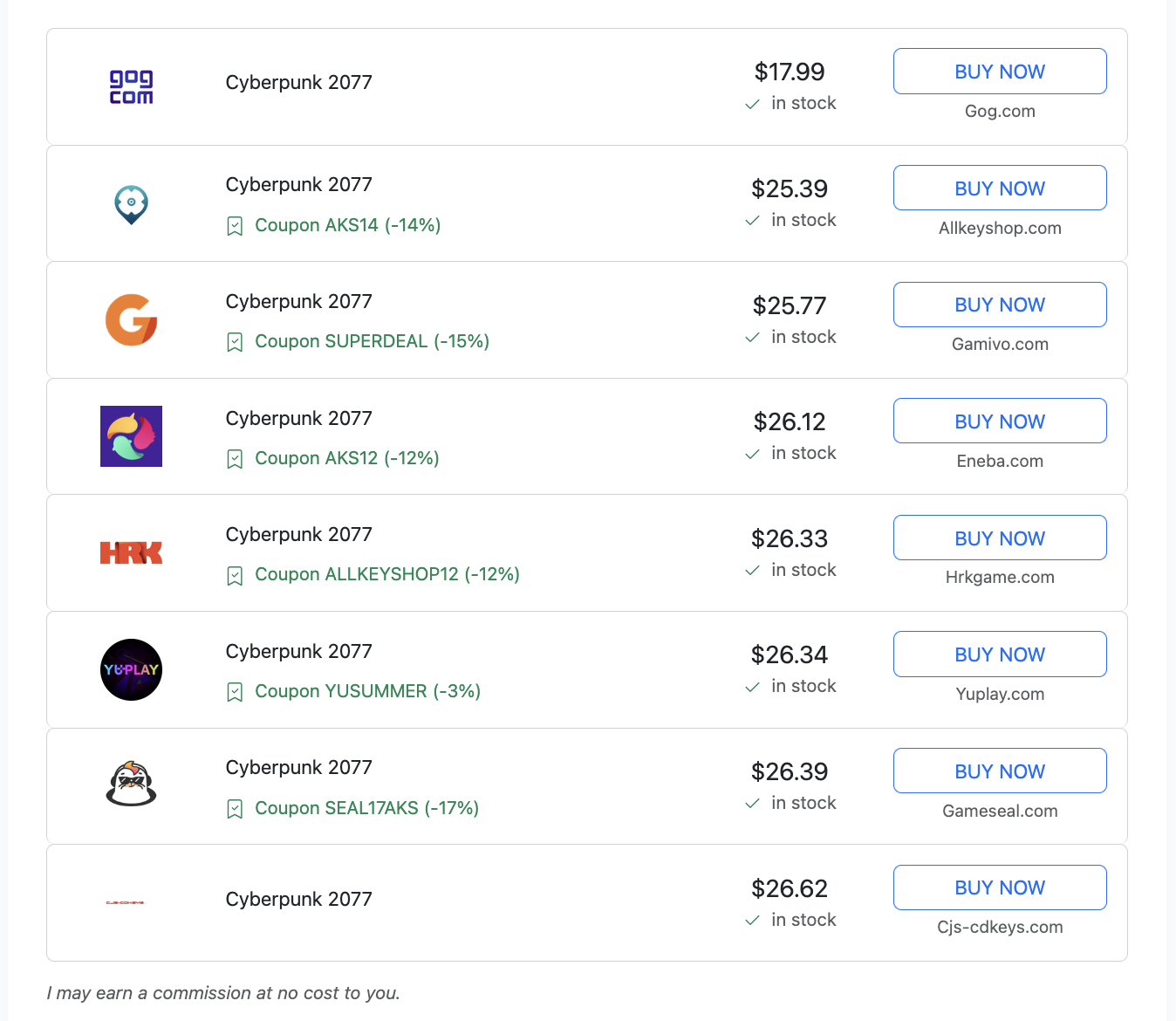
* **Price comparison tables** — every offer for one game as its own row, with the merchant, coupon code and region, ordered by price.
A price comparison table built from a single AllKeyShop search
### Joining the AllKeyShop affiliate program
The module needs an AllKeyShop account, because every offer link carries your affiliate ID.
Register on the AllKeyShop affiliate site:
`https://affiliate.allkeyshop.com/`
Signing up is free and takes a few minutes — an email address and a password. Once registered, request an **API token** for the AllKeyShop Search API. The affiliate dashboard also offers widgets and plain shopping links, which are separate from the API this module uses.
How you are paid is set by AllKeyShop, not by Content Egg. AllKeyShop holds the affiliate relationships with the individual key stores, tracks your clicks and sales through the ID embedded in your token, and pays you a share. You do not need to apply to each store separately, which is the main practical advantage over signing up to a dozen key-store programs one at a time.
{% hint style="info" %}
Your affiliate ID is embedded in the API token itself, so there is no separate tracking ID to enter. Content Egg passes every offer link through untouched — do not rewrite these links with a redirect plugin, or your clicks will not be attributed.
{% endhint %}
### API token
Enter your token in the module settings under **API token**. The module cannot search without it.
The AllKeyShop API allows **60 requests per minute** per token. Content Egg paces itself against that limit automatically. Going over the limit does not return a normal error — the connection stalls — and repeated bursts can get your server's IP blocked by AllKeyShop, so do not run the module through additional scripts of your own on the same token.
### Settings
| Setting | What it does |
| ------------------------ | --------------------------------------------------------------------------------------------------------------------------------------------------- |
| **API token** | Your AllKeyShop Search API token. Required. |
| **Locale** | Language for product names and links: German, English, Spanish, French, Italian, Dutch or Portuguese. |
| **Currency** | EUR, GBP or USD. AllKeyShop supports these three only. |
| **Activation country** | Optional two-letter country code, for example `DE`. Limits results to offers that can be activated in that country. Leave empty for no restriction. |
| **Price mode** | Which price to store. The default is the card price the store charges. **Best price** stores the lower price a coupon produces. |
| **Sort by / Sort order** | Relevance, popularity, price, rating, release date, name, random or product ID. |
| **Offers per product** | 1 to 10 — see [Two display modes](#two-display-modes) below. |
| **Allow game accounts** | Include offers selling a shared game account rather than a key. Off by default. |
| **Results** | How many products a search returns. |
{% hint style="warning" %}
**Activation country** must be an uppercase two-letter ISO code such as `DE`, `GB` or `US`. Lower case or a three-letter code is rejected and every search fails.
{% endhint %}
Ascending **sort order** only makes sense for Price and Name. Leave it on descending for Relevance, Popularity and Rating, or you get the worst matches first.
### Search methods
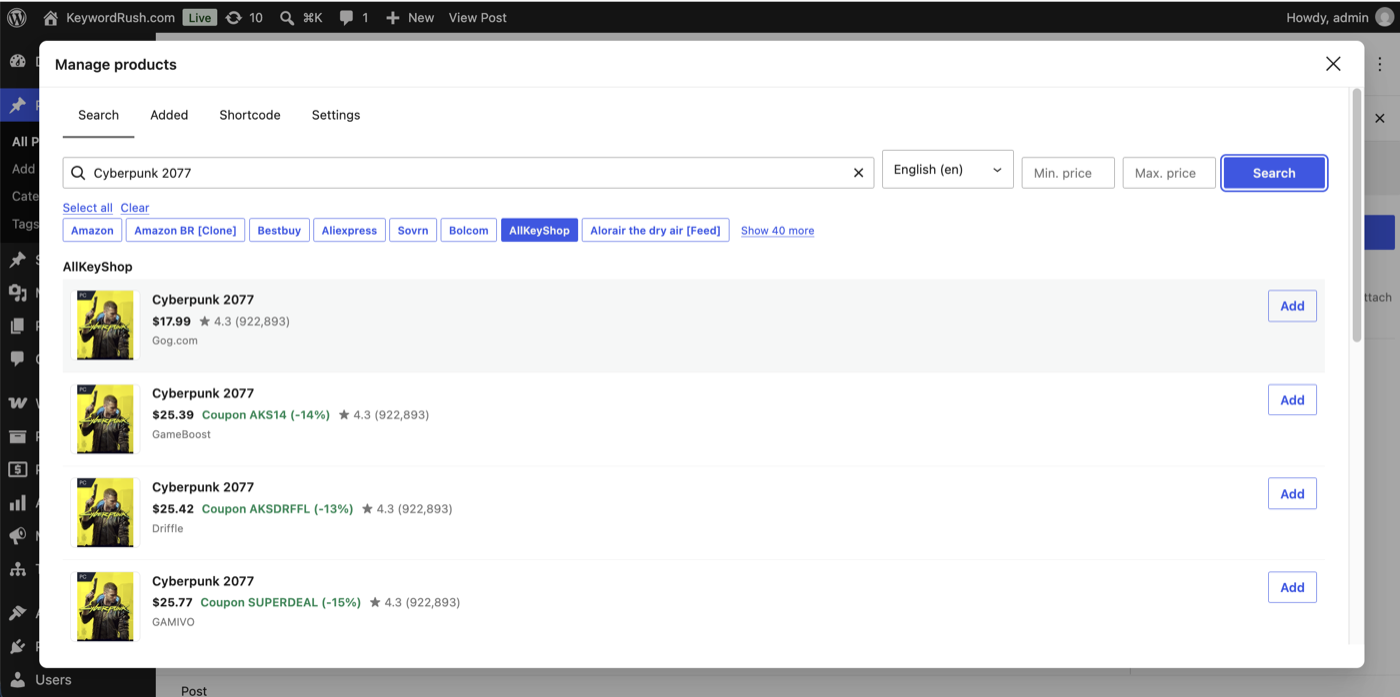
**Keyword search** — type a game title. Select the AllKeyShop tab and press Search.
Keyword search, with coupon codes shown against each offer
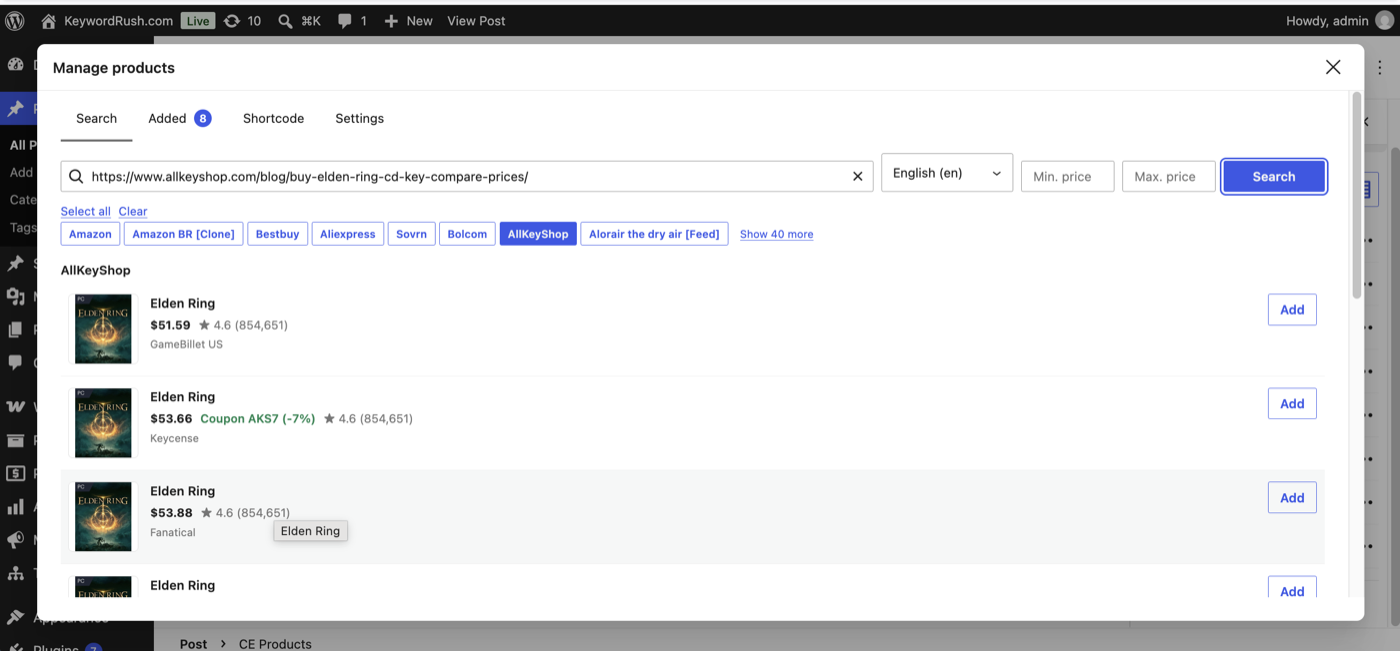
**Product URL search** — paste an AllKeyShop product page URL and the module resolves it to that exact game. Useful when a keyword matches several editions and you want one specific page.
`https://www.allkeyshop.com/blog/buy-elden-ring-cd-key-compare-prices/`
Searching by AllKeyShop product page URL
There is no EAN or barcode search — the AllKeyShop catalogue is keyed on its own product IDs rather than retail barcodes.
### Two display modes
The **Offers per product** setting decides the shape of your results.
**Offers per product = 1** (the default) returns one product per game, carrying its cheapest offer. This behaves like every other Content Egg affiliate module and suits reviews, roundups and "best of" articles.
**Offers per product = 2 to 10** returns each offer as its own product. One game becomes up to ten rows — the same title with different merchants, prices, regions and coupons — which is what a price comparison table needs. Sort by price in your template and you have a full comparison list.
{% hint style="warning" %}
Offers multiply. Ten products at ten offers each is 100 items on one post. Start with a low **Results** value when you switch this on.
{% endhint %}
Offers from the same game are grouped automatically under the game's title, so you can collapse a comparison post back down to one row per game with the `group_pick` block shortcode parameter:
```
[content-egg-block template=offers_logo_groups modules=Allkeyshop group_pick="cheapest"]
```
Every offer stays stored, but only the cheapest per game is displayed. `group_pick` works with block shortcodes only, not with module shortcodes — see [Shortcode parameters](/frontend/shortcode-parameters.md) and [Product groups](/frontend/groups.md).
### Coupon codes
Most key stores run a permanent AllKeyShop discount code, and the module imports it with the offer. The code and its percentage appear in every product template that shows promotions, for example `Coupon AKS12 (-12%)`.
Whether the stored price already includes that discount depends on **Price mode**. On the default card price the coupon is an extra saving the visitor applies at checkout. On **Best price** the stored price already assumes the code, so make sure your template shows the code — otherwise the price you advertise will not match the store.
### Merchant domains
Content Egg shows a store's domain next to each offer. The AllKeyShop API does not publish merchant domains, so the module ships with a built-in list covering the larger key stores — Eneba, Kinguin, G2A, GAMIVO, Fanatical, GOG, Driffle, HRK, GameBillet, Gamesplanet, K4G, Play-Asia and others.
A store that is not on that list falls back to showing `Allkeyshop.com`. To name it correctly, add it with the `cegg_allkeyshop_merchant2domain` filter:
```php
add_filter('cegg_allkeyshop_merchant2domain', function ($map, $slug, $name) {
$map['gameboost'] = 'gameboost.com';
$map['lootbar'] = 'lootbar.gg';
return $map;
}, 10, 3);
```
* **$map** *(array)* — Merchant slug to domain, as `'slug' => 'domain.com'`.
* **$slug** *(string)* — Slug of the merchant being resolved, for example `royal-cd-keys`.
* **$name** *(string)* — Display name of that merchant, for example `Royal CD Keys`.
Key the array on the **slug**, not the display name. Slugs are stable and lower case, while names vary by region — one store can appear as both `GameBillet US` and `GameBillet`. The slug is not the domain either: `royal-cd-keys` is royalcdkeys.com, and `gog-com` is gog.com. Add the entry to override a built-in value as well.
Once your token is granted access to the raw merchant URL field, the module reads it and resolves domains on its own, and the filter is no longer needed.
### Keeping prices updated
Key prices move constantly, so set a **Price update interval** in the module settings. Content Egg re-checks every saved offer by its AllKeyShop offer ID, so prices, stock status and coupon codes stay accurate without re-running your searches, and offers keep their position in your comparison table.
An offer that a store delists is marked out of stock rather than deleted, and keeps its last known price. Offers that come back into stock start updating again on their own.
### Product data
Each imported offer carries the merchant name and logo, price, stock status, coupon code and discount, activation region such as GLOBAL, US or EU, edition, activation platform, product type, release date, PEGI rating, publisher, genres, user rating and review count.
Product descriptions are not available through the AllKeyShop API, so use the AI content features or write your own copy.
### See also
* [Shortcode parameters](/frontend/shortcode-parameters.md) — `group_pick`, `modules`, `limit` and the rest.
* [Product groups](/frontend/groups.md) — collapse a comparison table to one row per game.
* [General module information](/modules/general-information.md) — update intervals and modes.
* [My network isn't listed](/modules/my-network-isnt-listed.md) — options for stores AllKeyShop does not cover.