> For the complete documentation index, see [llms.txt](https://ce-docs.keywordrush.com/llms.txt). Markdown versions of documentation pages are available by appending `.md` to page URLs; this page is available as [Markdown](https://ce-docs.keywordrush.com/modules/affiliate/clickwise.md).

# Clickwise module

Clickwise WordPress plugin: add Clickwise affiliate products to WordPress posts with Content Egg. Search the Clickwise GTIN catalog by keyword or EAN, publish your own tracked links and keep prices an

The **Clickwise module** connects WordPress to the [Clickwise](https://partners.clickwise.net/) affiliate network. It is the Content Egg way to run a Clickwise WordPress site: search the Clickwise product catalog from the post editor, add products to any post or page, and let Content Egg keep their prices and stock status up to date.

Clickwise is an affiliate meta-network. One publisher account gives you access to many merchant programs across Europe and the Americas, with one tracking link format and one payout. Its product catalog holds more than a million products with a GTIN (EAN or UPC), the largest markets being Spain, Germany, the United Kingdom and Portugal.

Every product link the module imports is a Clickwise tracked link created for your account, so sales are attributed to you without any extra setup.

#### What you can build

* **Product reviews and roundups** — "best of" articles with live prices, discounts and buy buttons.
* **Comparison tables** — products side by side with your own criteria, scores and current prices.
* **GTIN price comparison** — search by EAN to list every Clickwise merchant that sells the same product.

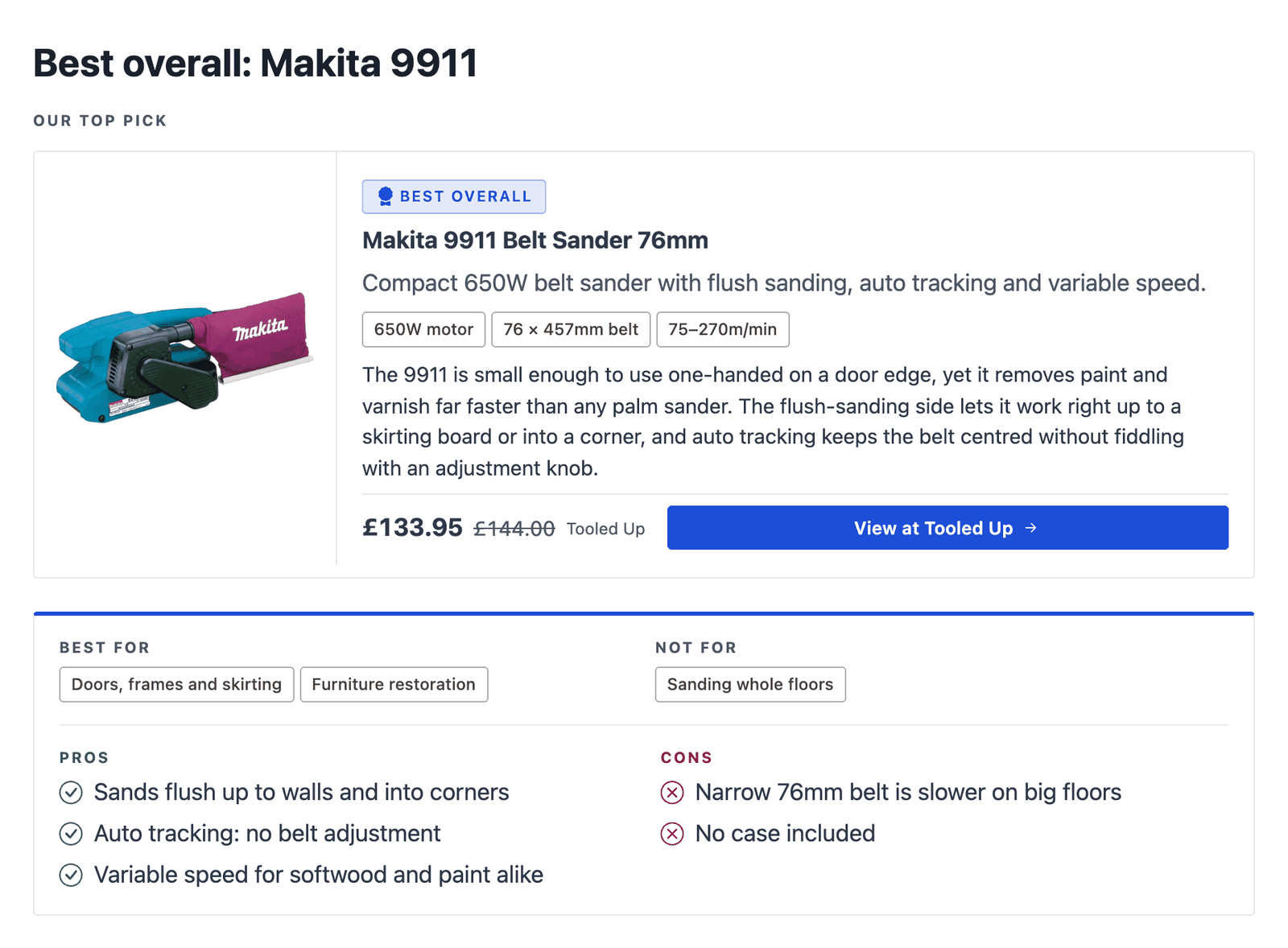
<figure><img src="https://4254262503-files.gitbook.io/~/files/v0/b/gitbook-x-prod.appspot.com/o/spaces%2F-M3fnB7iKYwDc1Xhr3H3%2Fuploads%2Fgit-blob-00e89c8d4b366fb38734c6d3b501cb4a7d55deda%2Fclickwise-product-card.png?alt=media" alt="Clickwise product in a WordPress review post: product card with price, discount and buy button"><figcaption><p>A Clickwise product in a review post, shown with the Product Card and Pros &#x26; Cons blocks</p></figcaption></figure>

### Clickwise plugin or product feed import?

Clickwise also offers product feeds that you can import into WooCommerce with a feed importer. The Content Egg module works differently: it searches the Clickwise catalog live through the Clickwise Publisher API, so there is no feed to download, map or schedule.

* You add only the products you write about, not the whole catalog.
* Prices, old prices and stock status refresh automatically by product ID.
* Products sold out or dropped by a merchant are marked out of stock instead of leaving dead links.
* The same products work in every Content Egg template and block, next to products from your other modules.

If you would rather import a full Clickwise feed, see [Feed modules](/modules/feed-modules.md).

### Getting a Clickwise API key

The module needs a Clickwise publisher account and its API key.

1. Create a free publisher account: `https://partners.clickwise.net/en/signup_affiliate/`
2. Apply to the merchant programs you want to promote.
3. Copy your **API key** from your Clickwise account.

{% hint style="warning" %}
The API returns products only from the programs you are approved in. If a new account finds nothing, apply to a few programs first and search again once they are approved.
{% endhint %}

To try the module before you join, request a free **sandbox key** on the [Clickwise developers page](https://partners.clickwise.net/developers/). It works for 14 days on a small sample catalog, allows 10 requests per minute and never earns commission. Replace it with your own publisher key before you publish.

### Settings

Go to **Content Egg > Modules > Clickwise**, enable the module and enter your key.

| Setting                   | What it does                                                                                                                                                         |
| ------------------------- | -------------------------------------------------------------------------------------------------------------------------------------------------------------------- |
| **API Key**               | Your Clickwise publisher API key. Required.                                                                                                                          |
| **Country**               | The market to search, for example United Kingdom, Spain or Germany. **All countries** searches every market.                                                         |
| **Merchant ID**           | Optional. Limits the search to one merchant.                                                                                                                         |
| **Price From / Price To** | Optional. Searches only products within this price range, in the selected country's currency. You can also set the range for a single search in the product manager. |
| **Results**               | How many products a search returns, up to 100.                                                                                                                       |
| **Results for updates**   | How many products automatic updates and autoblogging add.                                                                                                            |
| **Group size variants**   | Shows one result per product and color instead of one result per size. On by default.                                                                                |
| **Save images**           | Downloads product images to your Media Library.                                                                                                                      |

Set a **Country** for most sites. Prices come in the market's own currency, so mixing markets in one post also mixes currencies, and a price range only makes sense within one currency.

The Clickwise API allows 60 product requests per minute per account, which is far more than editor searches and scheduled updates use.

### Searching for products

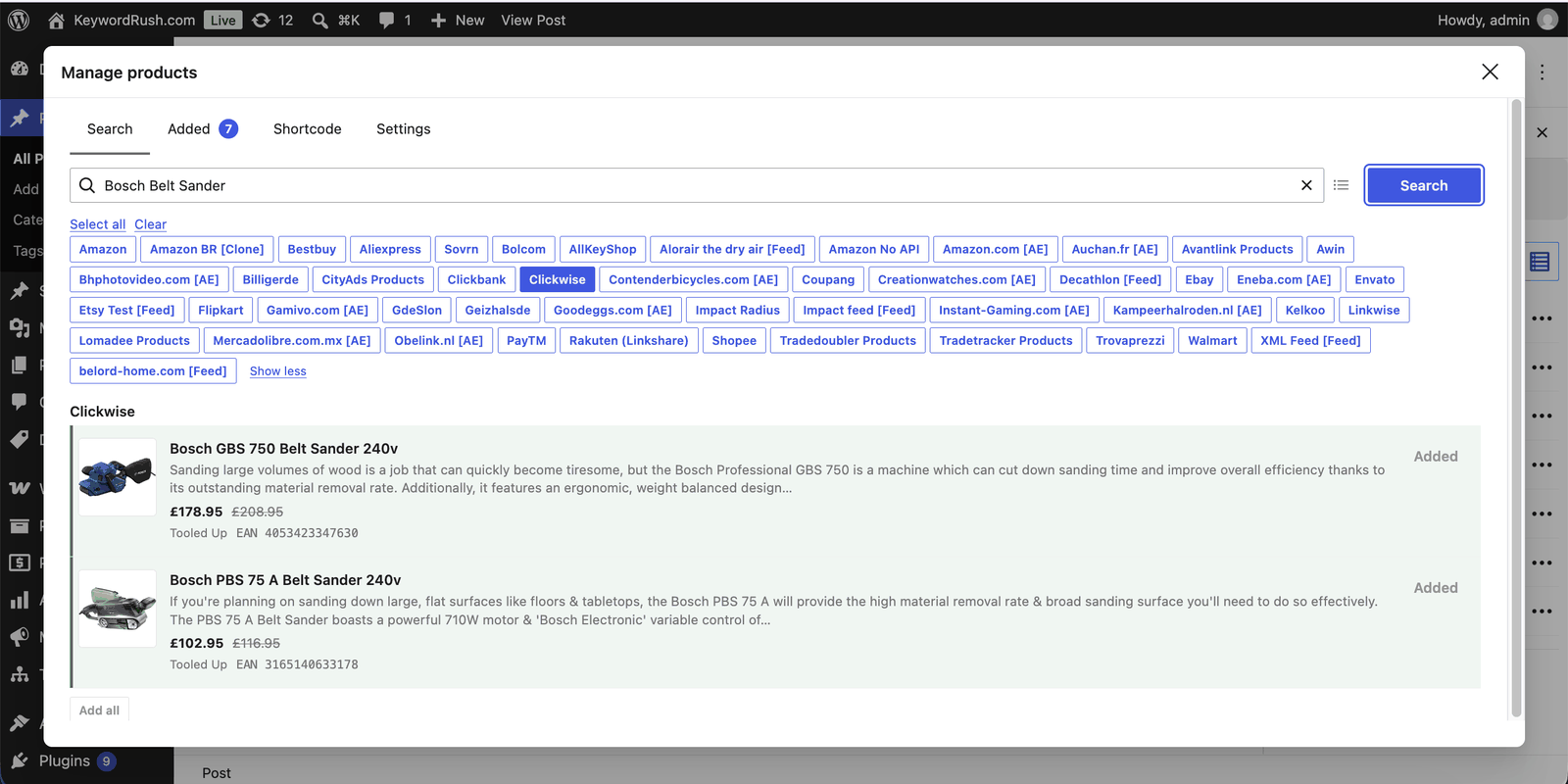
Open the post editor, click **Manage products**, select the **Clickwise** module and search.

<figure><img src="https://4254262503-files.gitbook.io/~/files/v0/b/gitbook-x-prod.appspot.com/o/spaces%2F-M3fnB7iKYwDc1Xhr3H3%2Fuploads%2Fgit-blob-8fb8846618aa0296b6d4b430a9d4268d05d67c88%2Fclickwise-search.png?alt=media" alt="Searching Clickwise products in the WordPress editor with Content Egg"><figcaption><p>Keyword search in the Content Egg product manager</p></figcaption></figure>

**Keyword search** — type a product name, such as `bosch belt sander`. The words can be in any order, and results are sorted by relevance. A search needs at least three characters.

**GTIN search** — enter an EAN, UPC or other GTIN of 8, 12, 13 or 14 digits, for example `3165140633178`. The module returns every Clickwise merchant that sells that product in the selected market, which makes it easy to build a price comparison for one product.

There is no product URL search: Clickwise links point to the tracking server, not to the merchant page.

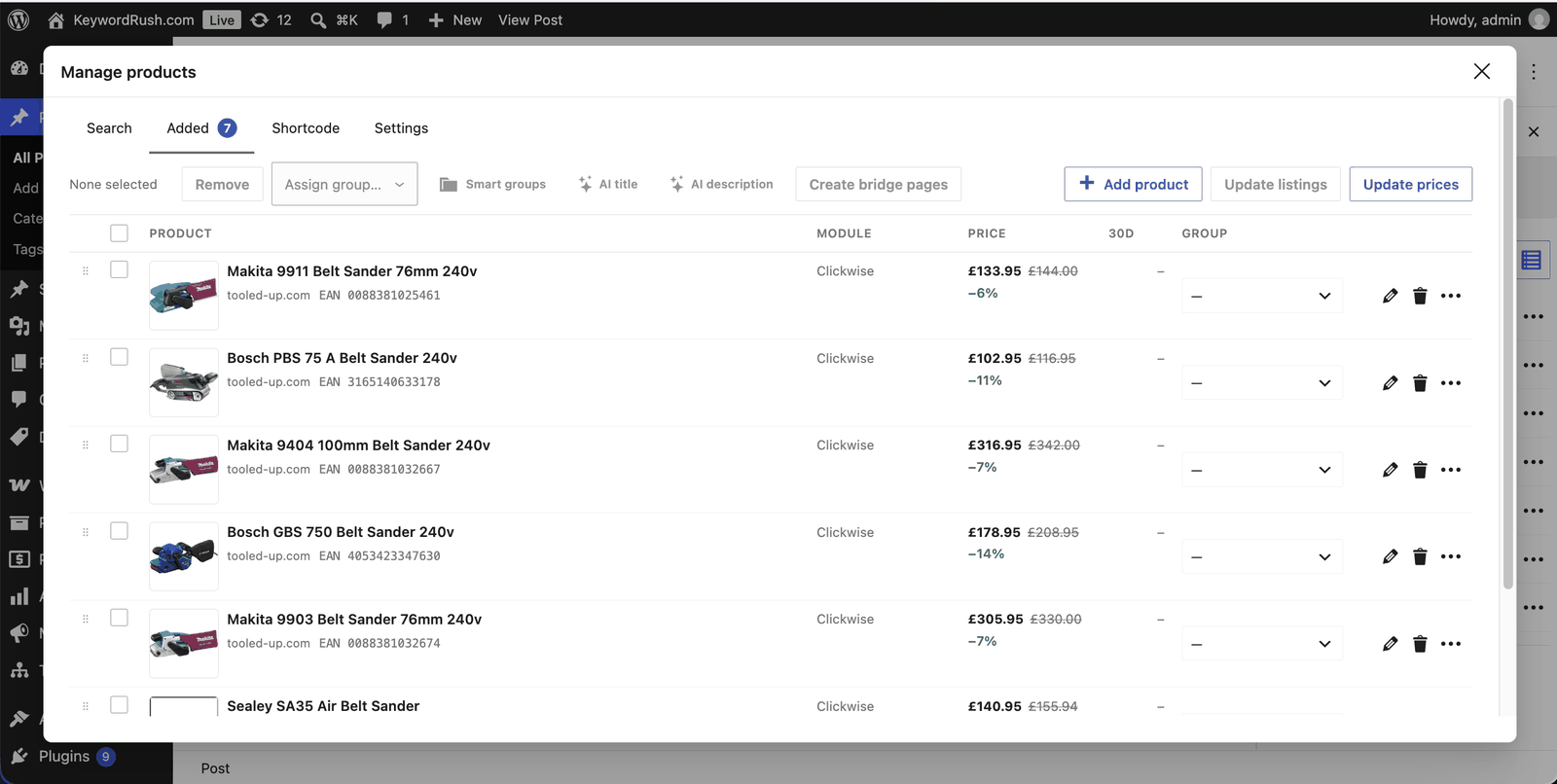
Added products appear in the **Added** tab with the merchant domain, EAN, current price and discount.

<figure><img src="https://4254262503-files.gitbook.io/~/files/v0/b/gitbook-x-prod.appspot.com/o/spaces%2F-M3fnB7iKYwDc1Xhr3H3%2Fuploads%2Fgit-blob-2a1e43a411dd6dd7cf8afa7105582891cea8efec%2Fclickwise-added-products.png?alt=media" alt="Clickwise products added to a WordPress post with prices, discounts and EANs"><figcaption><p>Added Clickwise products with live prices and discounts</p></figcaption></figure>

### Size variants

Fashion merchants list every size of a product as a separate item. Without grouping, a search for a pair of sneakers returns the same shoe over and over, once per size.

With **Group size variants** on, Clickwise returns one result per product and color: the cheapest size in stock, together with the list of sizes in stock. Each color stays a separate result, because colors usually have their own photo and price.

Turn the setting off if you need a specific size as its own product.

### Displaying Clickwise products

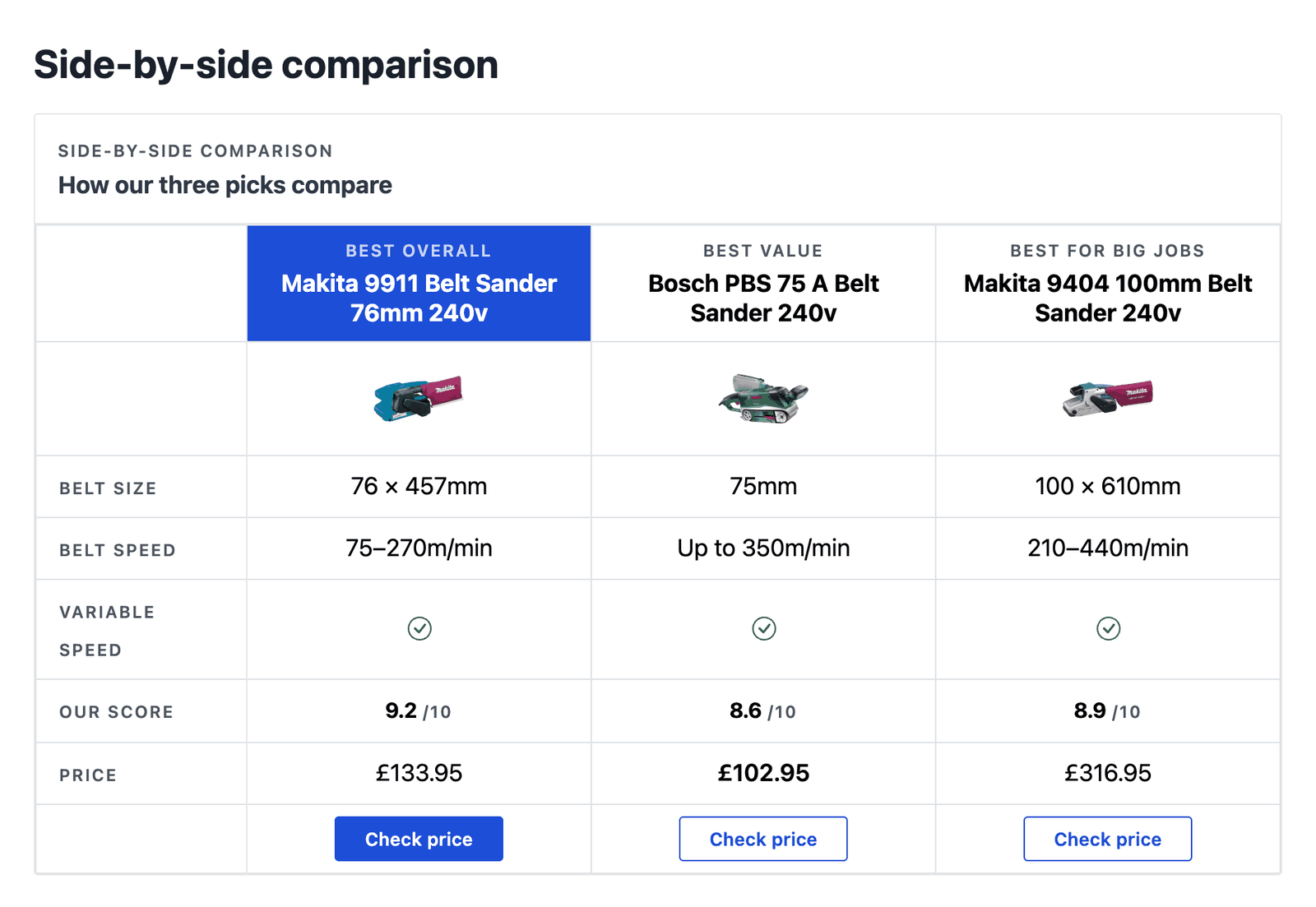
Clickwise products work with every Content Egg [product template](/frontend/shortcode-parameters.md) and with the product blocks, for example Product Card, Quick Picks and Comparison Table.

<figure><img src="https://4254262503-files.gitbook.io/~/files/v0/b/gitbook-x-prod.appspot.com/o/spaces%2F-M3fnB7iKYwDc1Xhr3H3%2Fuploads%2Fgit-blob-56efa6408d9795db2b291b24ca2eb0e308c27c56%2Fclickwise-comparison-table.png?alt=media" alt="WordPress comparison table of Clickwise products with prices and buy buttons"><figcaption><p>Clickwise products in a Comparison Table block</p></figcaption></figure>

To show only Clickwise products in a shortcode, use the `modules` parameter:

```
[content-egg-block template=offers_logo_btn modules=Clickwise]
```

{% hint style="info" %}
Clickwise product links are tracked links for your account. Publish them unchanged: do not shorten them or pass them through another redirect, or your sales will not be attributed.
{% endhint %}

### Keeping prices updated

Set a **Price update interval** in the module settings. Content Egg checks the saved products in batches of up to 100, by their Clickwise product ID, and updates the price, old price, stock status and link.

A product that Clickwise no longer returns, because it sold out or the merchant left your programs, is marked out of stock and keeps its last known price.

With **Group size variants** on, the saved product is the size that was cheapest when you added it. If that size sells out while others are still available, the product is marked out of stock. Search again to replace it.

### Merchant domains

Content Egg shows the store's domain next to each offer and uses it for the store logo. Clickwise sends each merchant's website domain, for example `tooled-up.com`. If a merchant has no domain, the merchant name is shown instead.

### Product data

Each imported product carries the title, image, description, brand, category, GTIN, price, old price, currency, stock status, merchant name and domain, and your tracked link. Products from fashion merchants also carry the size, color and list of sizes in stock.

### See also

* [Shortcode parameters](/frontend/shortcode-parameters.md) — `modules`, `limit`, `template` and more.
* [General module information](/modules/general-information.md) — update intervals and modes.
* [Feed modules](/modules/feed-modules.md) — import a full product feed instead.
* [My network isn't listed](/modules/my-network-isnt-listed.md) — options for other networks.