> For the complete documentation index, see [llms.txt](https://ce-docs.keywordrush.com/llms.txt). Markdown versions of documentation pages are available by appending `.md` to page URLs; this page is available as [Markdown](https://ce-docs.keywordrush.com/modules/affiliate/magalu.md).
# Magalu module
Magazine Luiza WordPress plugin: add Magalu products to WordPress posts with Content Egg. Paste a product URL, publish commissioned Parceiro Magalu links and keep prices updated automatically, without
The **Magalu module** connects WordPress to [Magazine Luiza](https://www.magazineluiza.com.br/), one of Brazil's largest online retailers. It is the Content Egg way to run a Magazine Luiza affiliate site: paste a Magalu product URL in the post editor, and Content Egg adds the product with its title, image, current price and a commissioned link for your **Parceiro Magalu** store. Prices then stay up to date on their own.
The module reads product data through Magalu's partner link API, so it does not scrape Magalu's pages. No proxy or scraping service is needed, and a product is added in about a second.
#### What you can build
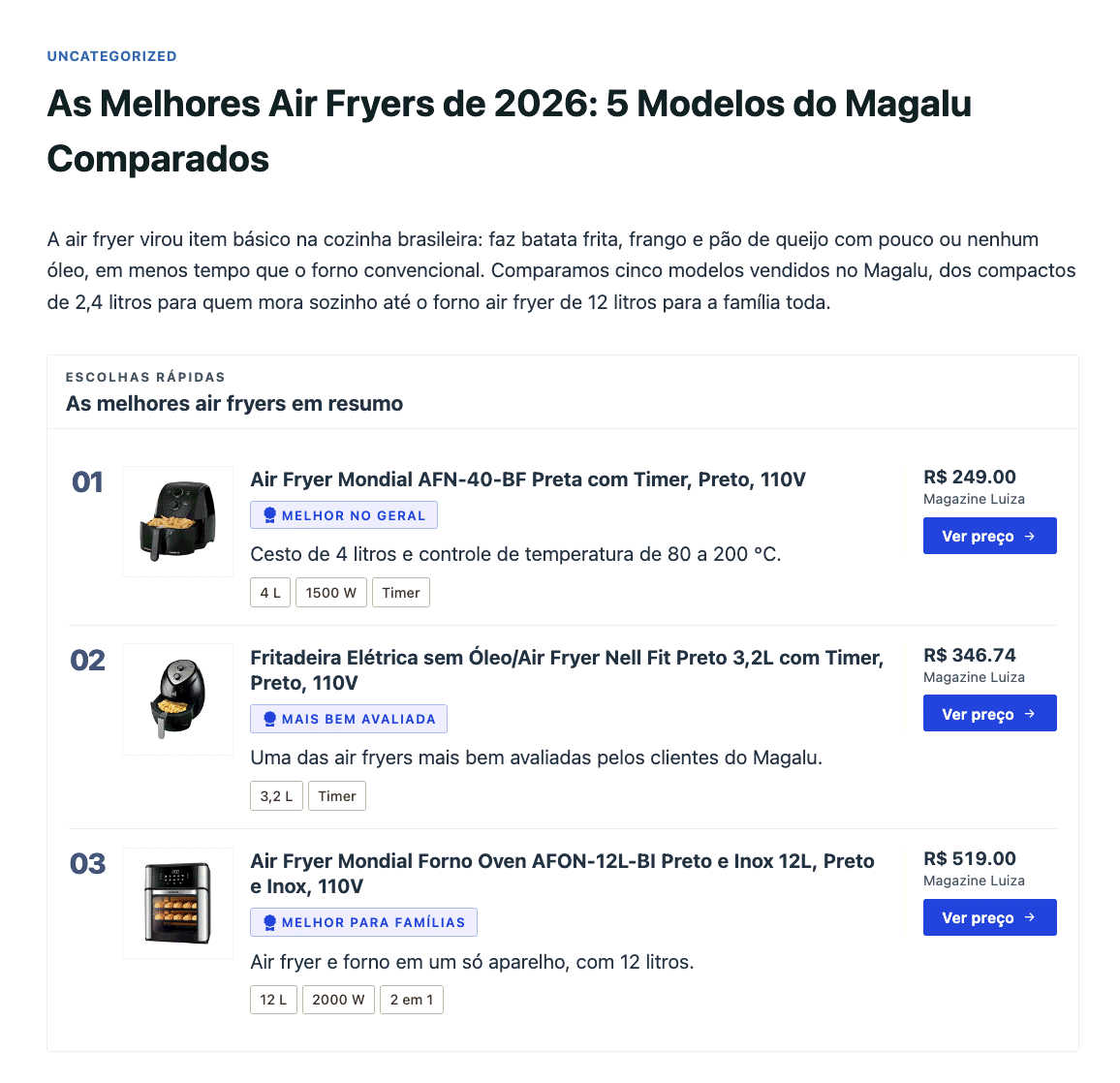
* **Buying guides and "best of" lists** — "As melhores air fryers", "Melhores smartphones até R$ 1.500" — with live Magalu prices.
* **Product reviews** with a featured product card, pros and cons, and a verdict box.
* **Comparison tables** that put several Magalu products side by side.
* **Price comparison** alongside your other Content Egg modules, such as Amazon or Shopee.
A buying guide built from five Magalu products
### Before you start: Parceiro Magalu
You need a **Parceiro Magalu** account, Magazine Luiza's affiliate program. Signing up is free. Once you join, you get your own storefront, for example:
`https://www.magazinevoce.com.br/magazinesualoja/`
The part after `magazine` (here, `sualoja`) is your **store name**. Content Egg uses it to generate commissioned links, so every sale through your site is credited to your store. Commission rates and payments are set by Magalu, not by Content Egg.
### Settings
| Setting | What it does |
| ----------------------------- | -------------------------------------------------------------------------------------------------------------------------------------------------------------- |
| **Store name or Promoter ID** | Your Parceiro Magalu store name, or your numeric Promoter ID. Required. Content Egg checks it when you save and shows an error if Magalu doesn't recognise it. |
| **UTM source** | Analytics label. Default: `site`. |
| **UTM medium** | Analytics label. Default: `affiliate`. |
| **UTM campaign** | Analytics label. Leave it empty to use your store name. |
| **Save images** | Store product images in your Media Library instead of loading them from Magalu. |
{% hint style="info" %}
Your commission is tracked by your **store name / Promoter ID**, not by the UTM labels. The UTM fields only tell Magalu's reports where a click came from. Keep the defaults unless you promote Magalu on several channels — site, Instagram, WhatsApp — and want to compare them.
{% endhint %}
### Adding products
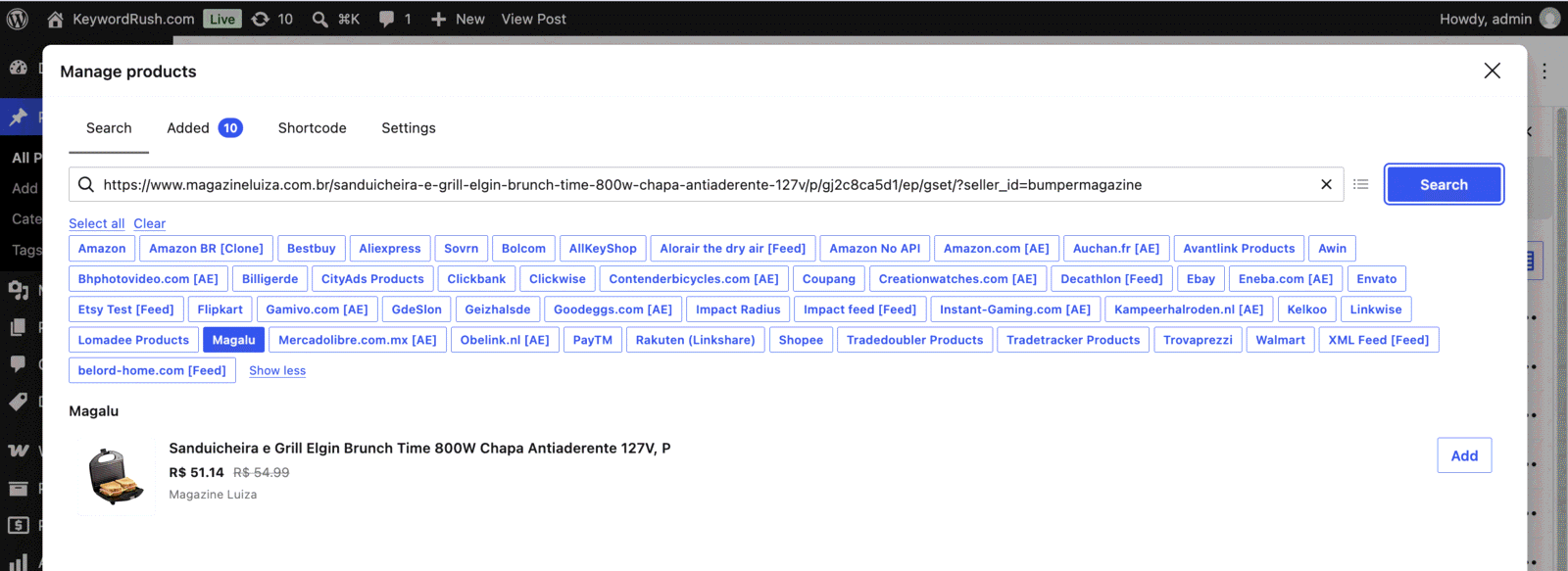
Open the **Content Egg** product manager in the post editor, select **Magalu** and paste a product URL:
`https://www.magazineluiza.com.br/air-fryer-mondial-afn-40-bf-preta-com-timer/p/236409700/ep/efso/`
Adding a Magalu product by its URL
The module accepts:
* **Product page URLs** from `magazineluiza.com.br`, including the mobile site and URLs with extra parameters such as `?seller_id=`.
* **Your Parceiro Magalu storefront URLs** on `magazinevoce.com.br`.
* **The product code** on its own, for example `236409700` — the part after `/p/` in the URL.
To add several products at once, paste several URLs separated by commas, with no spaces.
{% hint style="warning" %}
**There is no keyword search.** Magalu's API looks up products you already know; it can't search the catalogue. Find the products on magazineluiza.com.br first, then paste their URLs. Category pages, search result pages and short links (`onelink.me`, `divulgador.magalu.com`) are not supported — open the product page and copy its full URL.
{% endhint %}
### Keeping prices updated
Set a **Price update interval** in the module settings. Content Egg re-checks every saved Magalu product by its product code, updating the price, the original price before a discount and the affiliate link. Titles and images you edited are left alone.
* A product Magalu no longer lists is marked **out of stock** and keeps its last known price.
* If Magalu's API is temporarily unavailable or rate-limited, Content Egg pauses updates for 15 minutes and tries again later. Your saved prices are never cleared.
### Product data
Each product carries its title, image, current price, original price (shown struck through when the product is discounted), the commissioned link and the marketplace seller ID. Installment terms, such as `10x de R$ 49,59 sem juros`, are stored as extra data for custom templates.
Prices are in Brazilian reais. The thousands and decimal separators follow **Website Language** in **Content Egg → Settings → General**. Set it to **Portuguese (br)** to show `R$ 1.245,31` instead of `R$ 1,245.31`.
Product descriptions and ratings are not available through the API, so write your own copy or use the AI content features.
### Showing products in your posts
Magalu products work with every Content Egg block and template. For a review, combine a **Product Card** with **Pros & Cons** and a **Verdict** box: the price and the "Ver no Magalu" button stay linked to the product and update automatically.
A Magalu product card, pros and cons, and a verdict in the block editor
### Good to know
The Magalu partner link API is not a documented public API. Magalu can change it without notice, and Content Egg follows those changes in plugin updates. If you also use [Affiliate Egg](/integrations/affiliateeggintegration.md), its **MagazineLuiza.com.br** parser stays available as a fallback.
### See also
* [General module information](/modules/general-information.md) — update intervals and modes.
* [Block reference](/egg-blocks/block-reference.md) — quick picks, product cards, comparison tables and more.
* [Shortcode parameters](/frontend/shortcode-parameters.md) — show Magalu products with shortcodes.
* [Out-of-stock products](/updating-products/out-of-stock-products.md) — what happens when a product goes out of stock.