> For the complete documentation index, see [llms.txt](https://ce-docs.keywordrush.com/llms.txt). Markdown versions of documentation pages are available by appending `.md` to page URLs; this page is available as [Markdown](https://ce-docs.keywordrush.com/set-up-products/deals-websites.md).

# Deals websites

Build a deals site with Content Egg — ready-made deal pages, a deals archive, voting, and deals that expire on their own.

A deals site publishes one page per offer: a product, its current price, what it used to cost, and a button to the store. What separates a good deals site from a stale one is **freshness**: a deal that sold out or went back up in price should stop being shown as a deal.

Content Egg has a **Deals** feature built for exactly this. It adds a Deal post type whose pages assemble themselves from your product data, a deals archive with sorting and filters, visitor voting, and a lifecycle that expires deals automatically. It works with any theme, in both the free and the Pro version.

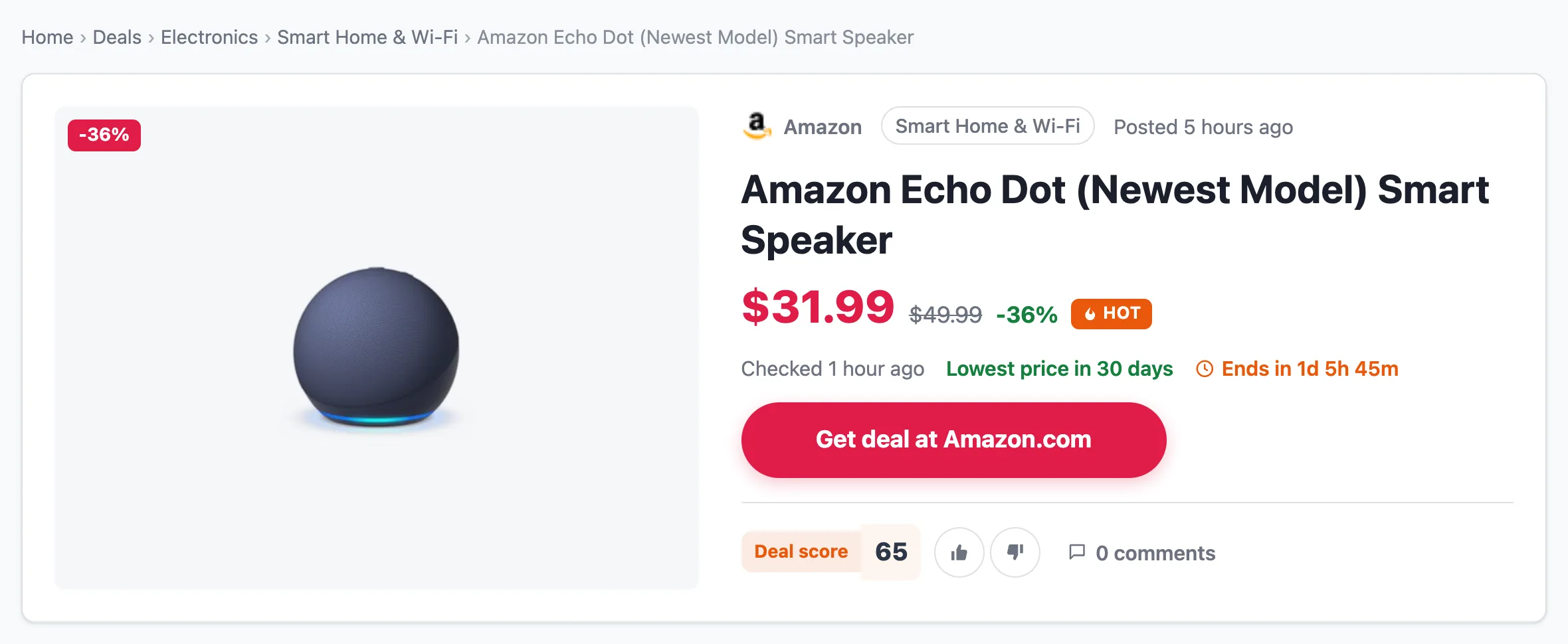
<figure><img src="https://4254262503-files.gitbook.io/~/files/v0/b/gitbook-x-prod.appspot.com/o/spaces%2F-M3fnB7iKYwDc1Xhr3H3%2Fuploads%2Fgit-blob-8d4ad2a8bfe7248044bae0c959eb3885916a8d01%2Fdeals-single-page.webp?alt=media" alt="A deal page: breadcrumbs, product image, store, category, price with old price and discount, Hot badge, Get deal at Amazon.com button and deal score voting"><figcaption><p>A deal page, assembled from the product's data</p></figcaption></figure>

### How deals work

* **A deal is a post of its own type**, not a regular post. Deals get their own archive (`/deals/`), their own store and category pages, and their own list in wp-admin.
* **A deal is one offer from one store.** You add products to a deal the usual way, and one of them is the deal's **main offer**. Its price, discount and stock decide the deal's status. Other products you add appear lower on the page as "All offers".
* **The page builds itself.** You write a line or two about the deal. Price, discount, store, the buy button, price history, a price alert form, the store's coupons and related deals are all added automatically.
* **Deals expire on their own.** When the product goes out of stock, its price rises, or the deal's end date passes, the deal is marked expired. It stays online, greyed out, so the page keeps its search traffic.

{% hint style="info" %}
Deals are **off by default**. Nothing changes on your site until you switch them on.
{% endhint %}

### Step 1: Turn deals on

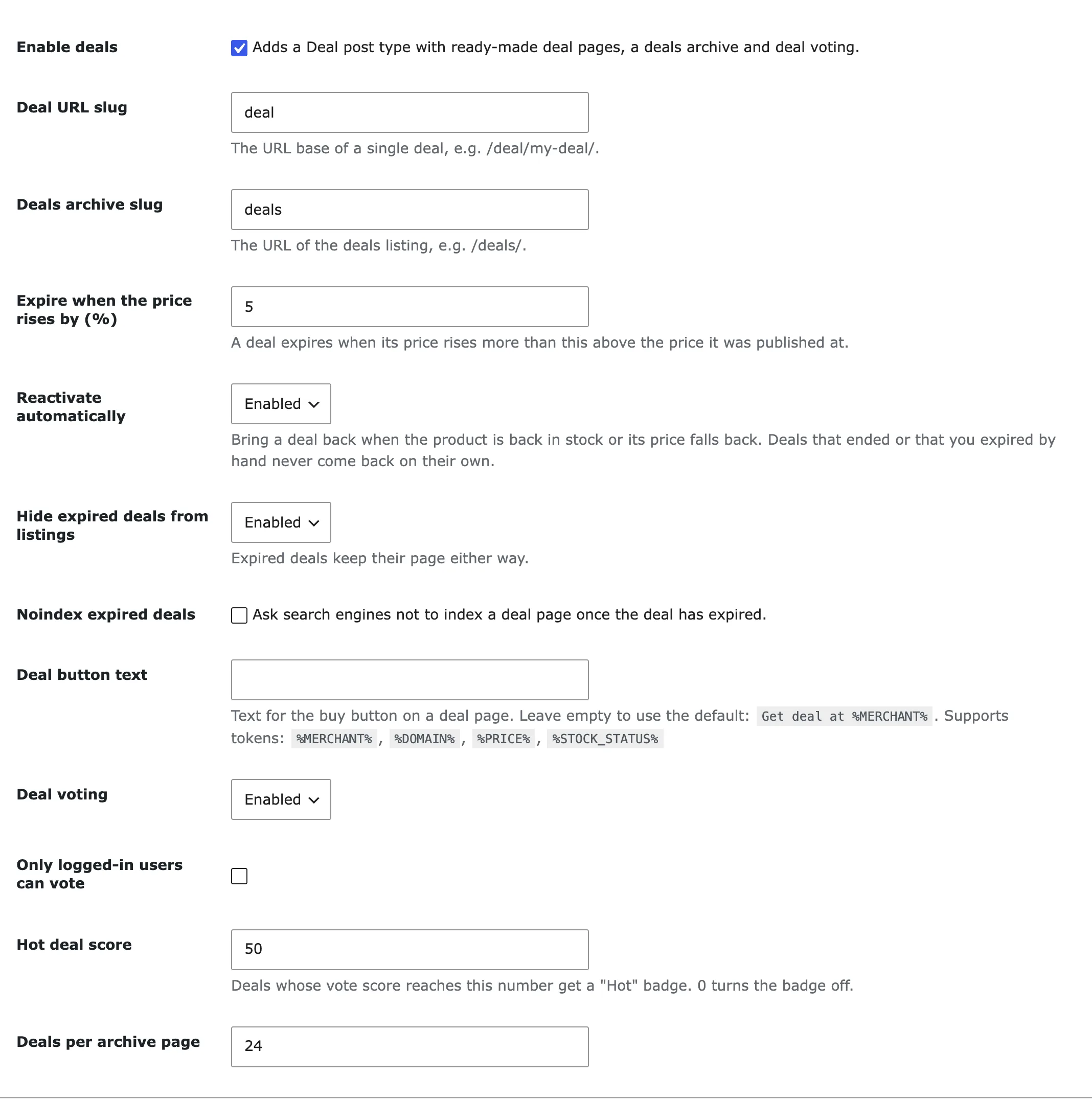
Go to **Content Egg → Settings → Deals** and tick **Enable deals**. A new **Deals** menu appears in wp-admin.

<figure><img src="https://4254262503-files.gitbook.io/~/files/v0/b/gitbook-x-prod.appspot.com/o/spaces%2F-M3fnB7iKYwDc1Xhr3H3%2Fuploads%2Fgit-blob-50a2f2c8d71dc4e64e99a55953da8c2bd3477149%2Fdeals-settings.webp?alt=media" alt="The Deals section of Content Egg settings"><figcaption><p>Content Egg → Settings → Deals</p></figcaption></figure>

| Setting                                | What it does                                                                                                                                                                                                                          |
| -------------------------------------- | ------------------------------------------------------------------------------------------------------------------------------------------------------------------------------------------------------------------------------------- |
| **Enable deals**                       | Adds the Deal post type, the deals archive, voting and the Deals block.                                                                                                                                                               |
| **Deal URL slug**                      | The URL base of a single deal. Default `deal`, e.g. `/deal/my-deal/`.                                                                                                                                                                 |
| **Deals archive slug**                 | The URL of the deals listing. Default `deals`, i.e. `/deals/`. Must differ from the deal slug.                                                                                                                                        |
| **Expire when the price rises by (%)** | A deal expires when its price rises more than this above the price it was published at. Default `5`.                                                                                                                                  |
| **Reactivate automatically**           | Brings a deal back when the product is back in stock or its price falls back. Deals that ended, or that you expired by hand, never come back on their own.                                                                            |
| **Hide expired deals from listings**   | Removes expired deals from the archive and from Deals blocks. Their pages stay online either way.                                                                                                                                     |
| **Noindex expired deals**              | Asks search engines not to index a deal page once it has expired.                                                                                                                                                                     |
| **Deal button text**                   | The text of the buy button on a deal page. Leave empty for **Get deal at** and the store name (**Get deal** when the store is unknown). Supports `%MERCHANT%`, `%DOMAIN%`, `%PRICE%` and `%STOCK_STATUS%`, e.g. `Get it for %PRICE%`. |
| **Deal voting**                        | Shows up/down voting on deals.                                                                                                                                                                                                        |
| **Only logged-in users can vote**      | Restricts voting to registered users.                                                                                                                                                                                                 |
| **Hot deal score**                     | Deals whose vote score reaches this number get a **Hot** badge on their card and page. `0` turns the badge off. Default `50`.                                                                                                         |
| **Deals per archive page**             | How many deals the archive shows per page. Default `24`.                                                                                                                                                                              |

### Step 2: Choose where deals come from

Deals use your existing Content Egg modules, so a deal can come from any store you already work with.

* **Amazon, Walmart, eBay, Best Buy** and other API modules (Pro): the best fit when you post deals from marketplaces.
* **Feed modules** (free and Pro): import an affiliate network's product feed and create deals from it, including automatically. See [Feed Import](/set-up-products/import-tools/feed-import.md).
* **Offer module**: add a deal from any store by URL, with a price you enter yourself.

Whichever you use, the module's **Price update** setting decides how often a deal's price and stock are re-checked, and so how quickly an expired deal is noticed. See [Price update](/updating-products/price-update.md).

### Step 3: Add deals

There are three ways to add deals. Most sites use more than one.

#### From a list of product links

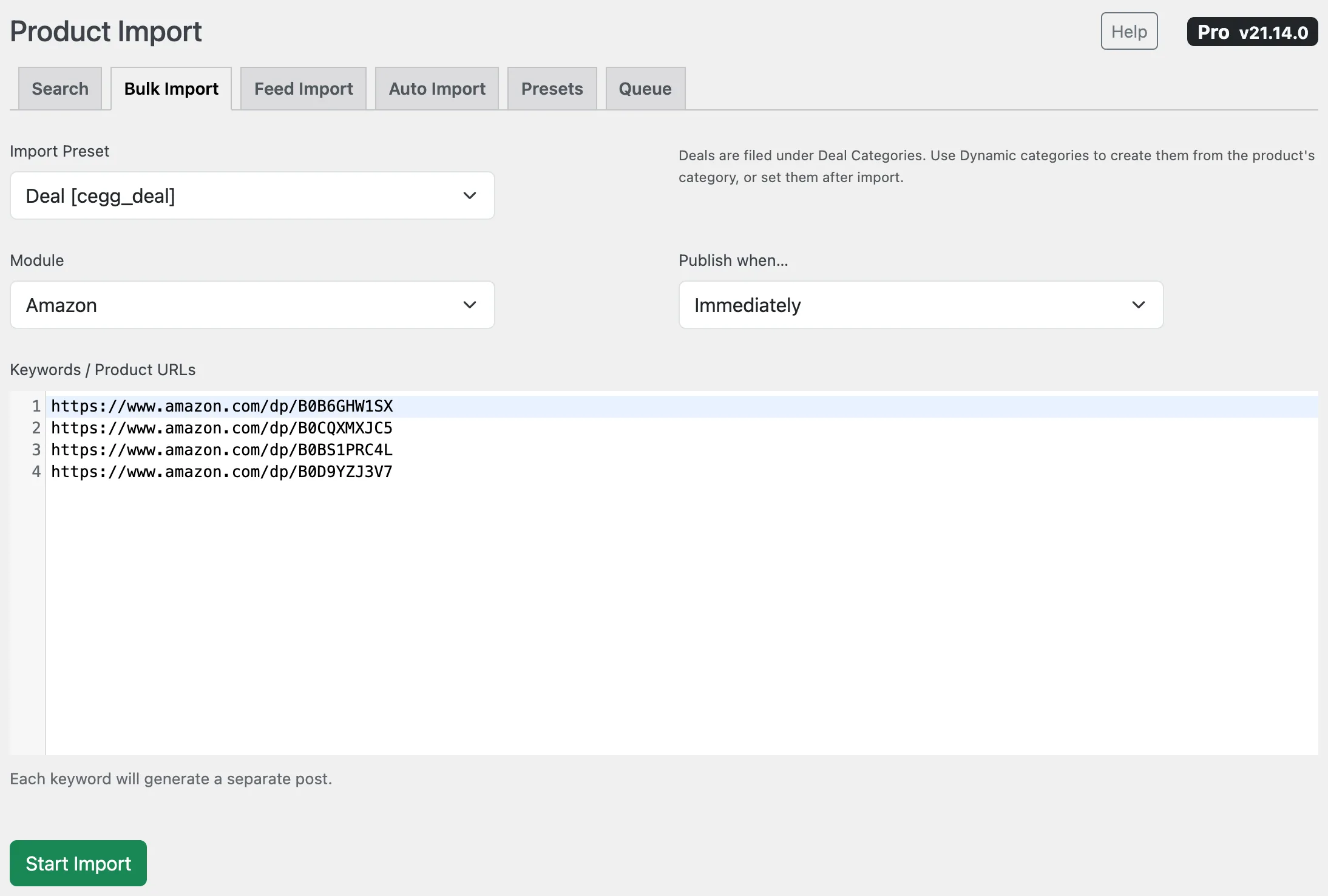
**Deals → Add deals** opens [Bulk Import](/set-up-products/import-tools/bulk-import.md) with the built-in **Deal** preset already selected. Paste product URLs or keywords, one per line, choose the module, and run it. Each line becomes a deal.

<figure><img src="https://4254262503-files.gitbook.io/~/files/v0/b/gitbook-x-prod.appspot.com/o/spaces%2F-M3fnB7iKYwDc1Xhr3H3%2Fuploads%2Fgit-blob-a2bff03f9a9b583e5f594a8d5f1649165605f842%2Fdeals-add-deals-bulk.webp?alt=media" alt="Bulk Import with the Deal preset selected and product URLs pasted"><figcaption><p>Deals → Add deals: one deal per product link</p></figcaption></figure>

The Deal preset creates deals as **drafts**, titled after the product and with the product's description as the text, so you can add a line of your own before publishing. The imported product becomes the deal's main offer.

{% hint style="success" %}
**Posting deals from videos or newsletters?** Collect the product links as you go, then paste them all into **Add deals** at once. You get one deal page per product, ready to link from your video description or email.
{% endhint %}

You can create your own deal presets too: in **Import Presets**, set **Post Type** to **Deal**. Deals are filed under **Deal Categories**, not post categories, so use **Dynamic categories** to create them from the product's category, or set them after import.

#### One deal at a time

**Deals → Add New Deal**, then add a product with Content Egg's product search as you would in any post. The first product with a price becomes the main offer. Write a short description and publish.

#### Automatically, with "real discounts only"

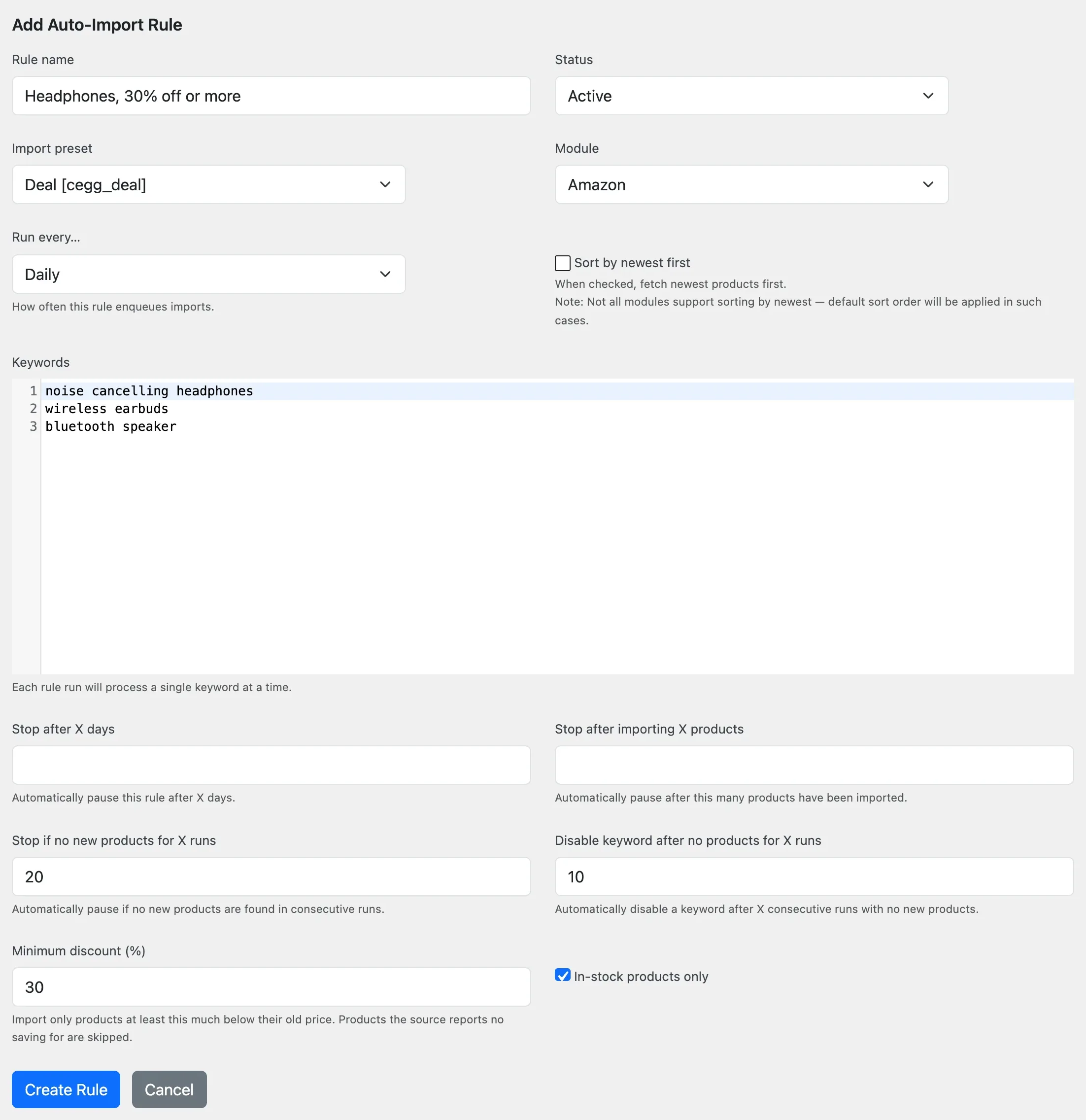
An [Auto Import](/set-up-products/import-tools/auto-import.md) rule with a Deal preset keeps adding deals from a keyword list on a schedule. Two rule settings keep it to real deals:

* **Minimum discount (%)**: imports only products at least this much below their old price. Products the source reports no saving for are skipped.
* **In-stock products only**: skips products that are out of stock.

<figure><img src="https://4254262503-files.gitbook.io/~/files/v0/b/gitbook-x-prod.appspot.com/o/spaces%2F-M3fnB7iKYwDc1Xhr3H3%2Fuploads%2Fgit-blob-6587c84a93fef6a88a7377501e69b6ab24ae0c3d%2Fdeals-auto-import-rule.webp?alt=media" alt="An auto-import rule with Minimum discount and In-stock products only"><figcaption><p>An auto-import rule that imports only real discounts</p></figcaption></figure>

The rule's log shows how many products were skipped, e.g. `Skipped by discount or stock rule: 7`.

{% hint style="warning" %}
The discount is the one the store reports: the gap between the product's old price and its current price. Stores do not always keep old prices honest, so check your first imports before you let a rule publish without review.
{% endhint %}

### Managing a deal

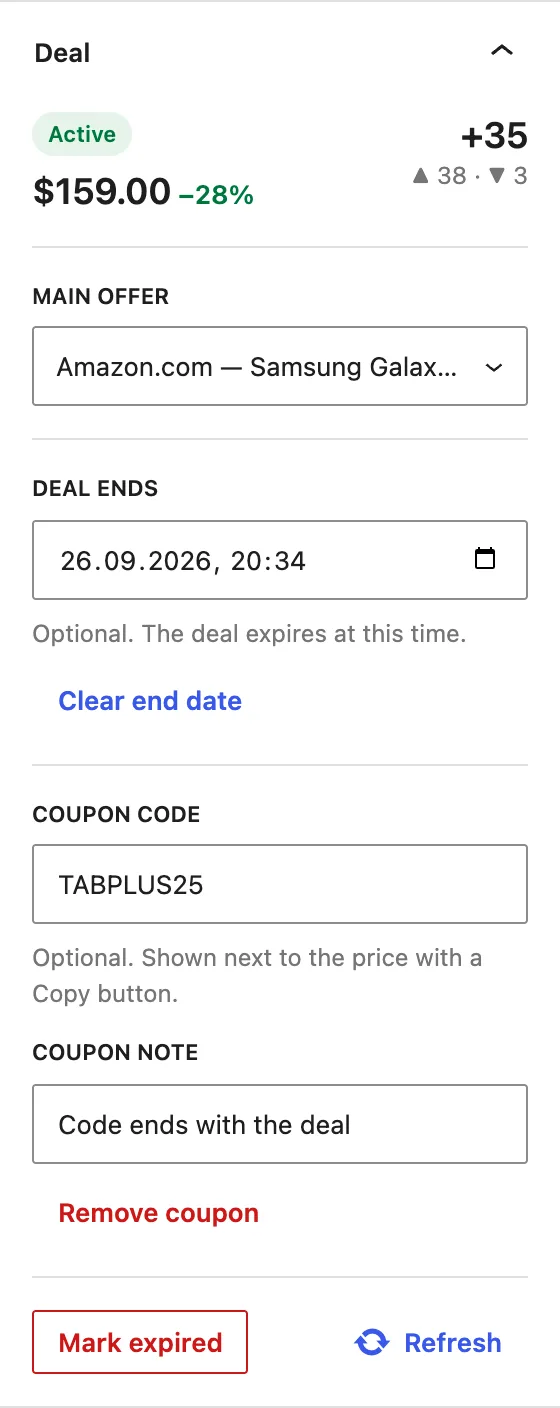
When you edit a deal, the **Deal** panel in the editor sidebar shows its state and lets you change it.

<figure><img src="https://4254262503-files.gitbook.io/~/files/v0/b/gitbook-x-prod.appspot.com/o/spaces%2F-M3fnB7iKYwDc1Xhr3H3%2Fuploads%2Fgit-blob-4c3001c3f6c5d4849948e547a3bd3f9105ad18c1%2Fdeals-editor-panel.webp?alt=media" alt="The Deal panel in the block editor sidebar: status, price and score, main offer, end date, coupon code and note"><figcaption><p>The Deal panel</p></figcaption></figure>

| Control                              | Use it to                                                                                                                                     |
| ------------------------------------ | --------------------------------------------------------------------------------------------------------------------------------------------- |
| **Main offer**                       | Choose which product the deal is about, when it has several. Choosing one resets the deal's reference price to that product's current price.  |
| **Deal ends**                        | Set a date and time when the deal ends. The page shows a countdown, and the deal expires when the time comes. **Clear** removes the end date. |
| **Mark expired / Mark active again** | Expire a deal by hand, or bring an expired deal back. Bringing it back resets the reference price to today's price.                           |
| **Coupon code / Coupon note**        | Give the deal its own coupon code, with an optional one-line note. See [Deals with a coupon code](#deals-with-a-coupon-code).                 |
| **Refresh**                          | Reload the panel after you add or remove products.                                                                                            |

The panel also shows the deal's votes.

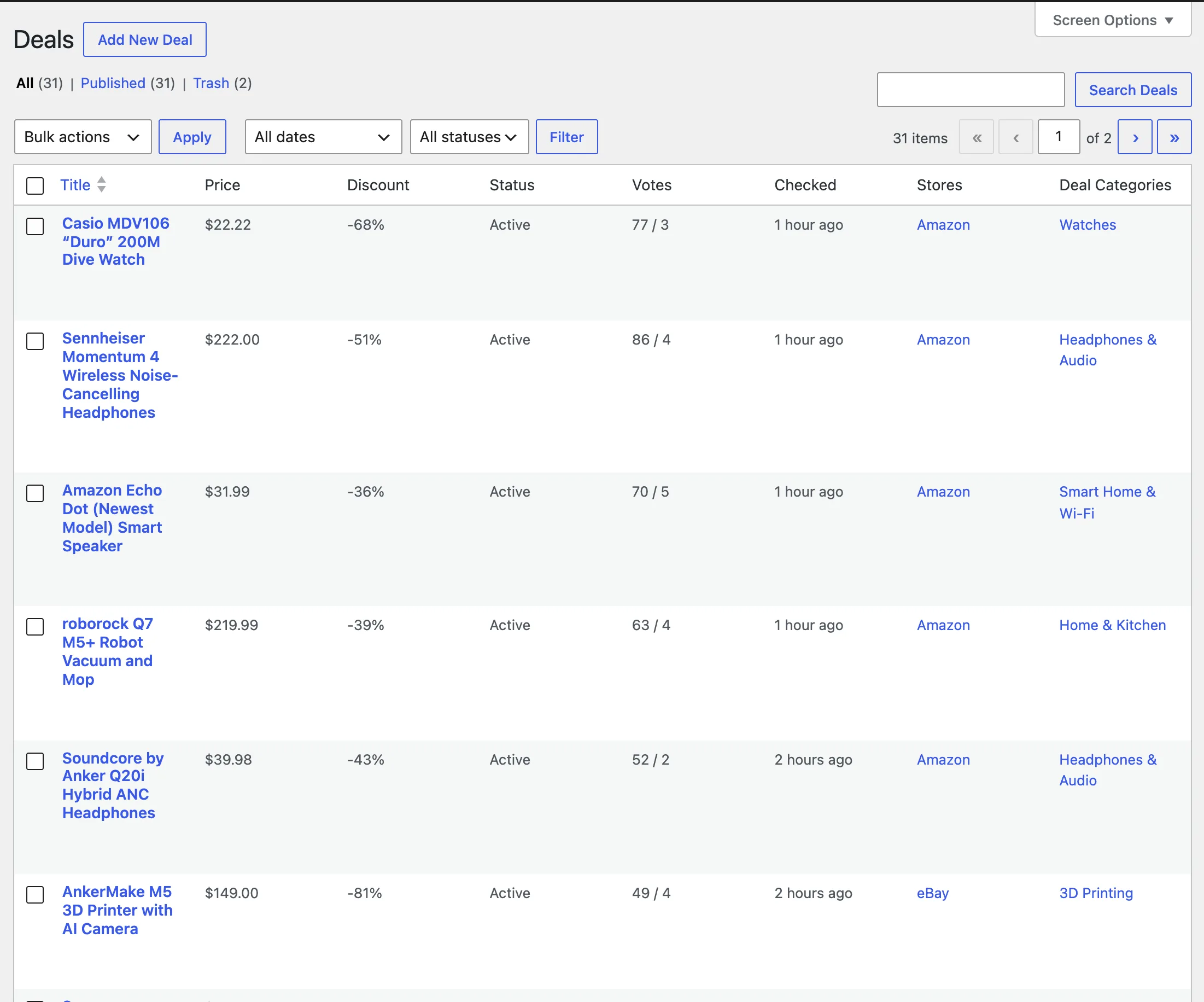
**Deals → All Deals** lists every deal with its price, discount, status, votes, and when its price was last checked. The status filter shows only active or only expired deals.

<figure><img src="https://4254262503-files.gitbook.io/~/files/v0/b/gitbook-x-prod.appspot.com/o/spaces%2F-M3fnB7iKYwDc1Xhr3H3%2Fuploads%2Fgit-blob-8e793f3c8c012dd0409e4d913fbb9cf081ca19b9%2Fdeals-admin-list.webp?alt=media" alt="Deals → All Deals with price, discount, status and votes columns"><figcaption><p>Deals → All Deals</p></figcaption></figure>

### Deals with a coupon code

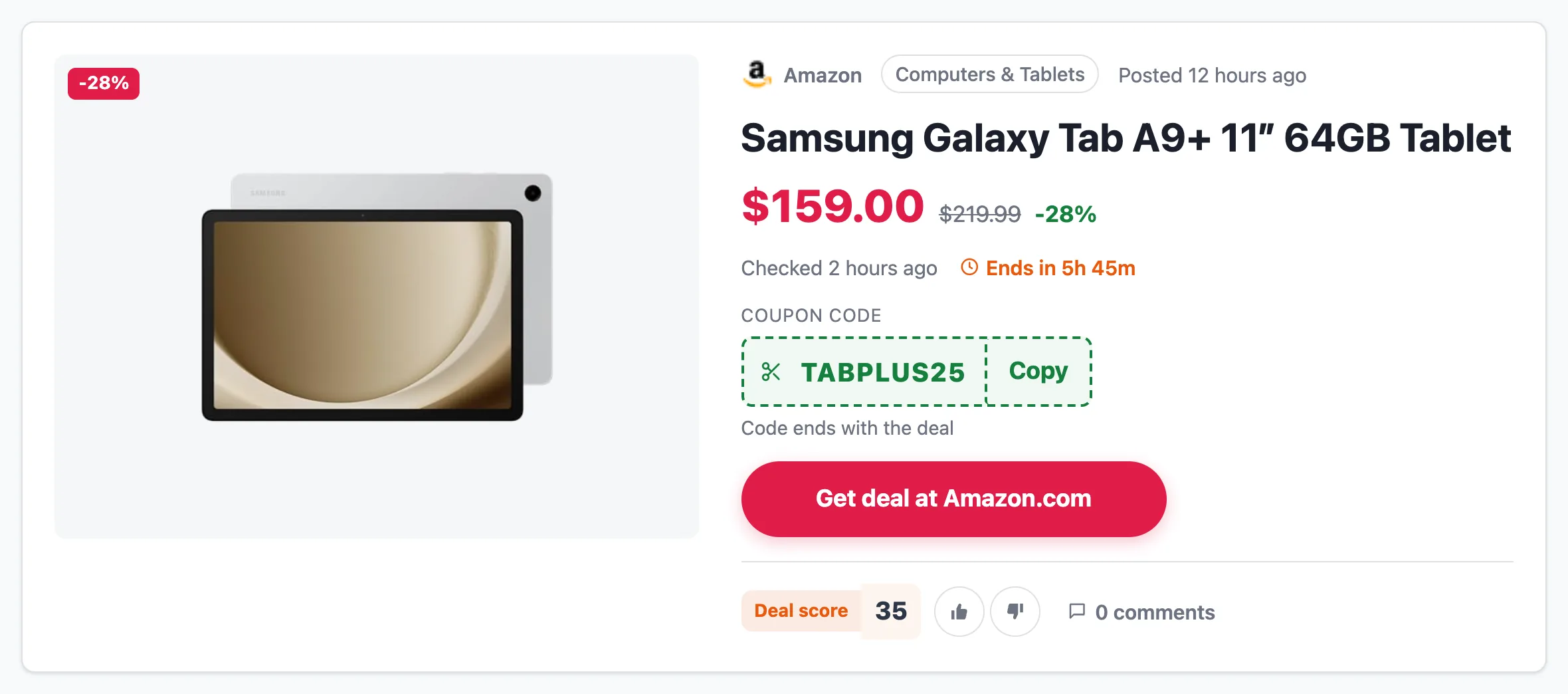
Many deals need a code at checkout. Enter it in the **Deal** panel under **Coupon code**, add a **Coupon note** if the code needs explaining (e.g. `Extra 20% off at checkout`), and click **Save coupon**.

The code then appears on the deal page, next to the price and the buy button, with a **Copy** button. The deal's card in the archive and in blocks gets a **Coupon** label.

<figure><img src="https://4254262503-files.gitbook.io/~/files/v0/b/gitbook-x-prod.appspot.com/o/spaces%2F-M3fnB7iKYwDc1Xhr3H3%2Fuploads%2Fgit-blob-39926a1cc838260de63d08c398665f1c583d6abe%2Fdeals-coupon.webp?alt=media" alt="A deal page with a coupon code box, Copy button and note under the price"><figcaption><p>A deal with its own coupon code</p></figcaption></figure>

* The coupon belongs to the deal. It has no end date of its own: set **Deal ends** if the code expires, and the deal expires with it.
* **Remove** in the panel deletes the coupon.
* Shop-wide coupons from [Shops & coupons](/frontend/shops-and-coupons.md) still appear lower on the deal page, as before.

### When deals expire

A deal's status is re-checked every time its price is updated, and once an hour for end dates.

| The deal shows                   | Why                                                                                | Comes back on its own?                               |
| -------------------------------- | ---------------------------------------------------------------------------------- | ---------------------------------------------------- |
| **Expired: out of stock**        | The main offer is out of stock.                                                    | Yes, when it is back in stock.                       |
| **Expired: the price went up**   | The price rose more than your threshold above the price the deal was published at. | Yes, when the price falls back.                      |
| **Expired: no longer available** | The main offer was removed from the deal.                                          | Yes, when it is added back.                          |
| **Expired: the deal has ended**  | The deal's end date has passed.                                                    | No. Set a new end date or use **Mark active again**. |
| **Expired**                      | You expired it by hand.                                                            | No. Use **Mark active again**.                       |

"Comes back on its own" applies only while **Reactivate automatically** is on.

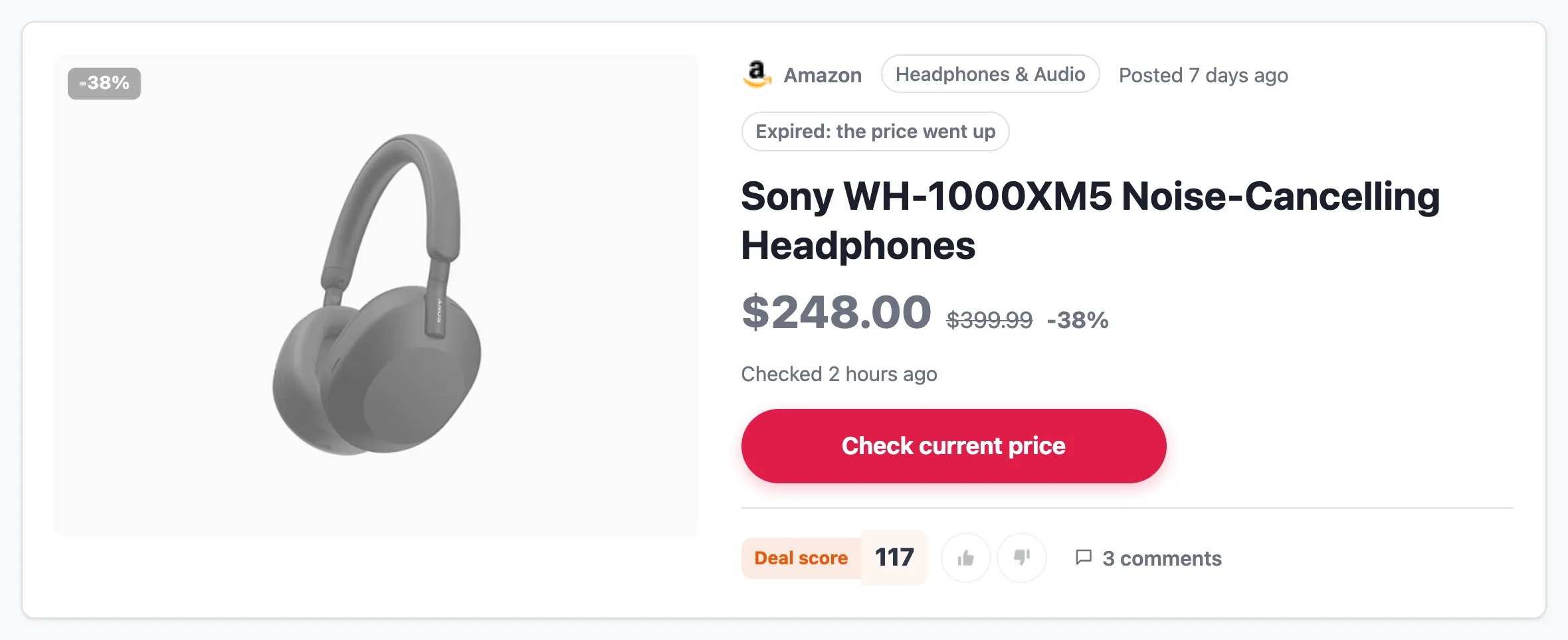
An expired deal stays online. Its page and card are greyed out with the reason, voting is closed, and the button reads **Check current price** instead of **Get deal**. By default, expired deals are hidden from the archive and from Deals blocks.

<figure><img src="https://4254262503-files.gitbook.io/~/files/v0/b/gitbook-x-prod.appspot.com/o/spaces%2F-M3fnB7iKYwDc1Xhr3H3%2Fuploads%2Fgit-blob-e1c2cb87965689861739ba79cbbc0f2437c5c197%2Fdeals-expired.webp?alt=media" alt="An expired deal: greyed-out image and an &#x27;Expired: the price went up&#x27; label"><figcaption><p>An expired deal keeps its page</p></figcaption></figure>

{% hint style="info" %}
A price that keeps dropping never expires a deal. The deal is compared with the price it was published at, and a lower price is still a deal.
{% endhint %}

### What visitors see

#### The deal page

From top to bottom, each part appears only when there is something to show:

* breadcrumbs: **Home › Deals › category › deal**;
* the product image with a discount badge; the store, the deal's category and when it was posted; the title; the price, old price and discount, with a **Hot** badge for highly voted deals;
* **Checked N hours ago**: when the price was last verified;
* **Lowest price in 30 days**: shown only when the price history covers at least 30 days, the price was higher earlier in that period, and today's price is the lowest in it. New deals earn this badge over time;
* a countdown, when the deal has an end date;
* the deal's coupon code, if it has one;
* the buy button (**Get deal at** and the store name by default, or your **Deal button text**), which uses your [affiliate link redirects](/features/affiliate-link-redirects.md) when they are on, and voting;
* your description, under **Deal details**;
* [price history](/updating-products/price-history.md) (once the product has at least two recorded prices) and a [price alert](/updating-products/price-alert.md) form for the main offer;
* **All offers**, when the deal has products from more than one store;
* the store's coupons from [Shops & coupons](/frontend/shops-and-coupons.md);
* related deals from the same category or store;
* comments.

Deal pages also output Product structured data with a single Offer for the main offer, including `priceValidUntil` when the deal has an end date.

#### The deals archive

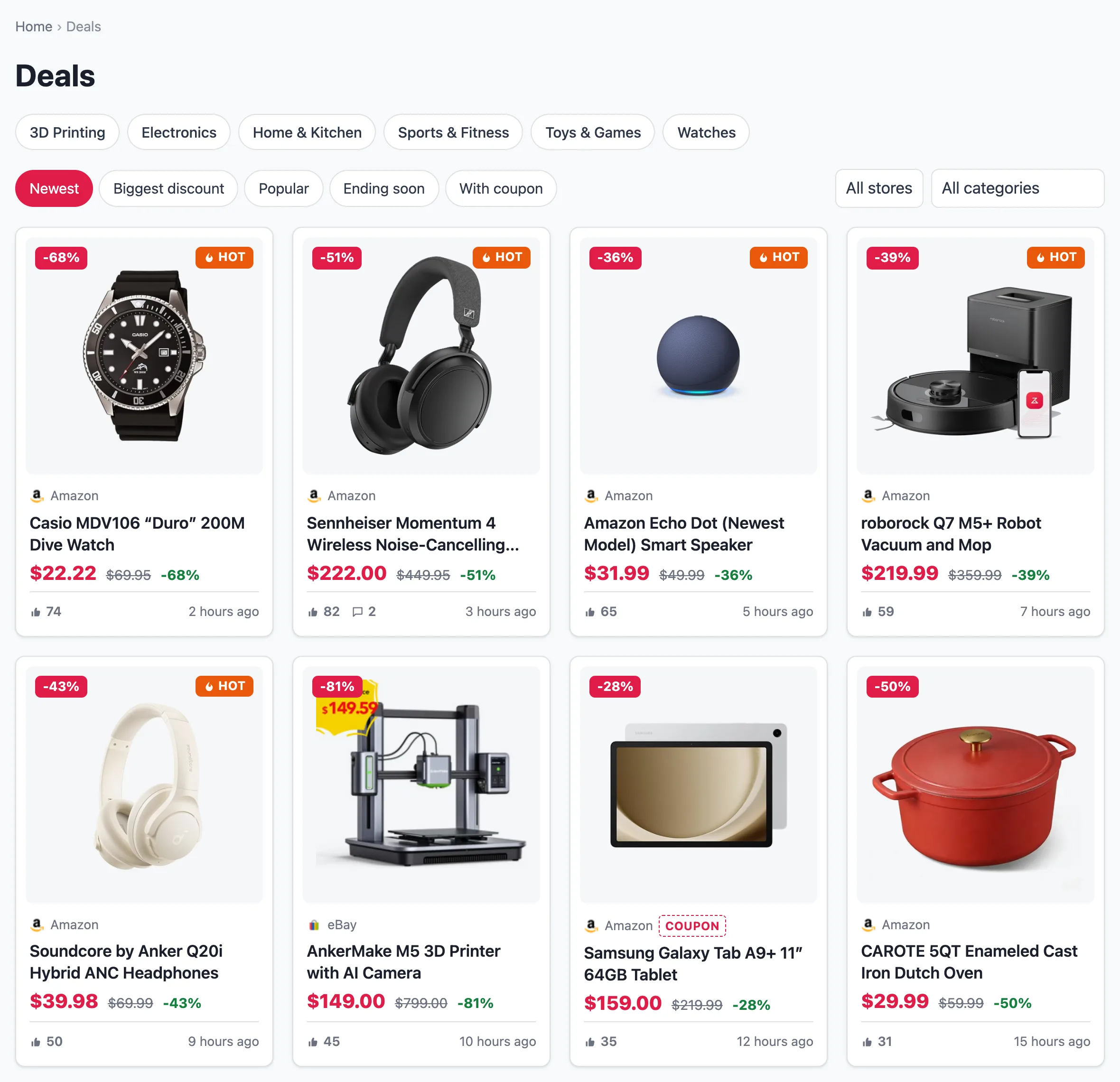
`/deals/` lists all active deals as cards. A row of category links sits under the title. Visitors can sort by **Newest**, **Biggest discount**, **Popular** or **Ending soon**, filter by store and category, and show only deals **With coupon**.

<figure><img src="https://4254262503-files.gitbook.io/~/files/v0/b/gitbook-x-prod.appspot.com/o/spaces%2F-M3fnB7iKYwDc1Xhr3H3%2Fuploads%2Fgit-blob-6ff8c0d37c0a78d6f5b570af32ca65d31620216e%2Fdeals-archive.webp?alt=media" alt="The deals archive with sort links, store and category filters and a grid of deal cards"><figcaption><p>The deals archive at /deals/</p></figcaption></figure>

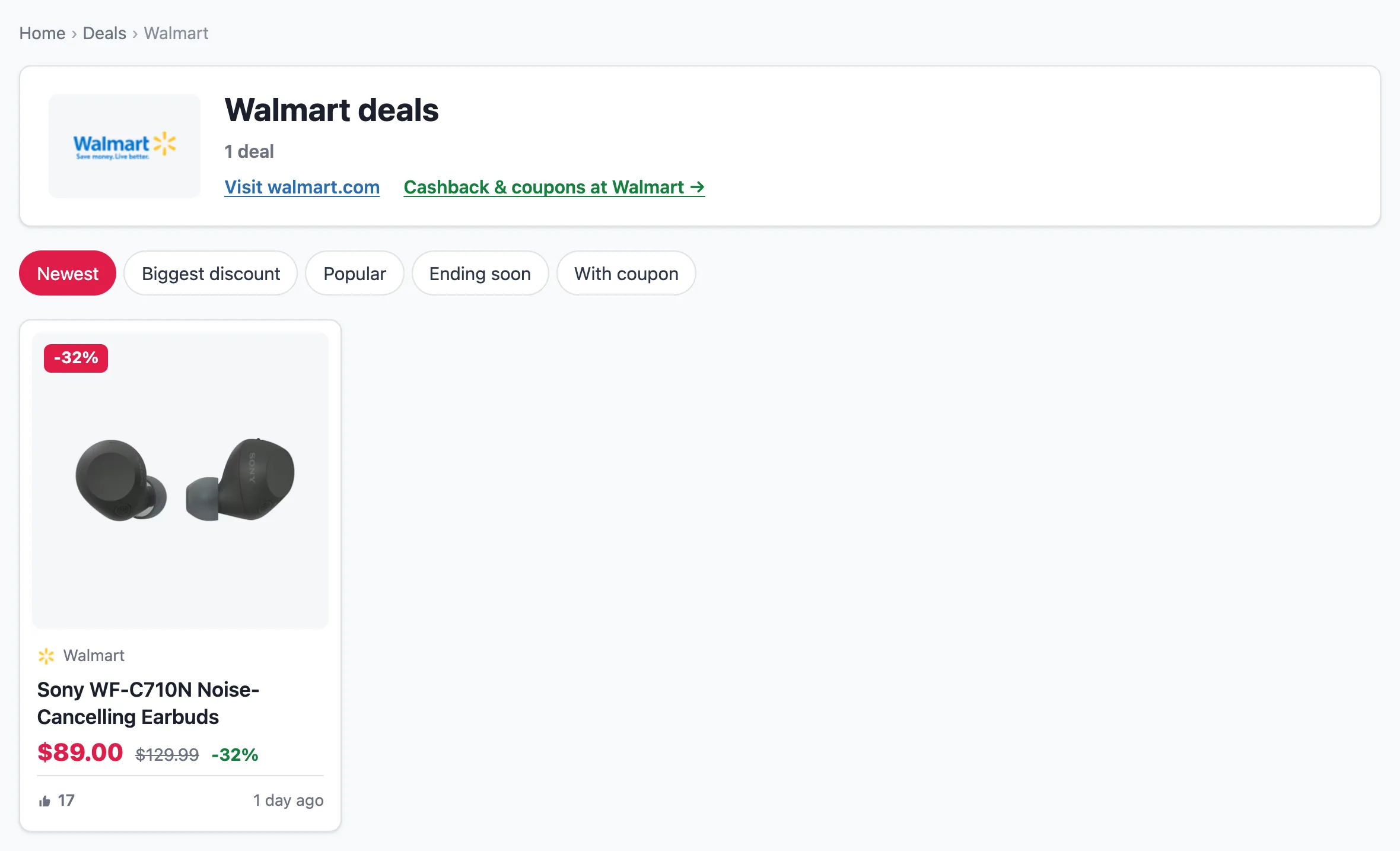
Every store and every category has its own page too, e.g. `/deals/store/amazon-com/` and `/deals/category/electronics/`. Stores are created automatically from the deal's shop, so a new store needs no setup. You can rename a store, or add a description to it, under **Deals → Stores**.

#### Store and category pages

* **Breadcrumbs** appear on every deal page, the archive and each store and category page. They include BreadcrumbList structured data, unless Yoast SEO or Rank Math is active: those plugins output their own.
* **A store page** starts with the store's logo, its number of deals, its description and a **Visit** link to the store. It also shows the store's coupons from [Shops & coupons](/frontend/shops-and-coupons.md). If the store has an **About** text in Shops, that text appears below the deals.
* **With** [**Cashback Tracker**](/integrations/cashback-tracker-integration.md) installed, a store page also links to that store's Cashback Tracker shop page, where members earn cashback.
* **A category page** shows links to its subcategories.

<figure><img src="https://4254262503-files.gitbook.io/~/files/v0/b/gitbook-x-prod.appspot.com/o/spaces%2F-M3fnB7iKYwDc1Xhr3H3%2Fuploads%2Fgit-blob-619813855f1826ca640598bf8ddf6d3109c14db8%2Fdeals-store.webp?alt=media" alt="A store page: breadcrumbs, the Walmart logo, deal count, Visit walmart.com and a Cashback &#x26; coupons at Walmart link, then the store&#x27;s deals"><figcaption><p>A store page, with the link to its Cashback Tracker shop page</p></figcaption></figure>

#### Voting

Visitors can vote a deal up or down, once per deal. The score appears on the deal and its card, and **Popular** sorts by it. Voting closes when a deal expires.

### The Deals block

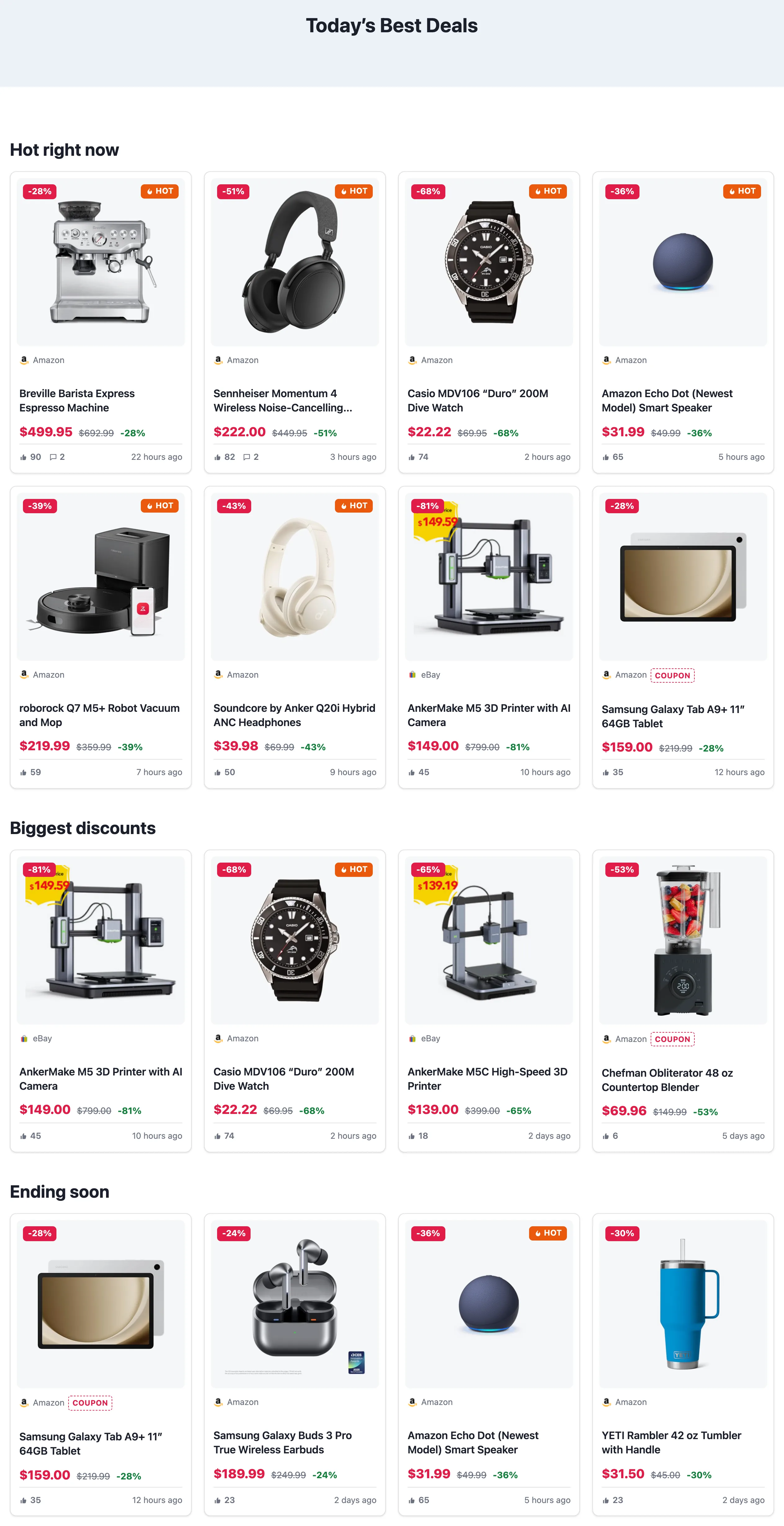
Put deals anywhere on your site, such as a homepage, a sidebar or a category page, with the **Deals** block from the **Content Egg** block category.

<figure><img src="https://4254262503-files.gitbook.io/~/files/v0/b/gitbook-x-prod.appspot.com/o/spaces%2F-M3fnB7iKYwDc1Xhr3H3%2Fuploads%2Fgit-blob-0f08251adfe07467b87aa25307cf2d692de71587%2Fdeals-block.webp?alt=media" alt="A page with three Deals blocks: Hot right now, Biggest discounts, Ending soon"><figcaption><p>Deals blocks on a homepage</p></figcaption></figure>

| Option                              | Values                                                             |
| ----------------------------------- | ------------------------------------------------------------------ |
| **Sort**                            | Newest, Biggest discount, Popular, Ending soon                     |
| **Number of deals**                 | 1–48                                                               |
| **Columns**                         | 1–6                                                                |
| **Only deals from the last N days** | e.g. `1` for "Today's deals", `7` for "Top this week"; `0` for all |
| **Store slugs**                     | comma-separated, e.g. `amazon-com`                                 |
| **Category slugs**                  | comma-separated                                                    |
| **Hide expired deals**              | on or off                                                          |
| **Only deals with a coupon code**   | on or off (`coupon_only=1` in the shortcode)                       |

In the classic editor, or in a widget, use the shortcode with the same options:

```
[content-egg-deals sort=popular days=7 limit=8]
[content-egg-deals sort=discount limit=4 columns=4]
[content-egg-deals sort=ending limit=4]
[content-egg-deals store=amazon-com category=electronics]
[content-egg-deals coupon_only=1 limit=4]
```

A few layouts that work well on a homepage:

* **Hot right now**: `sort=popular days=7`
* **Biggest discounts**: `sort=discount`
* **Ending soon**: `sort=ending`
* **Today's deals**: `sort=new days=1`

### A recommended workflow

1. **Start with one or two stores** you already have affiliate access to, and turn deals on.
2. **Post your first deals by hand** with **Add deals**, so you see how pages and expiry behave with your modules.
3. **Set the module's Price update** to a schedule that suits your deals. Once or twice a day is enough for most sites.
4. **Build the homepage from Deals blocks**: popular this week, biggest discounts, ending soon.
5. **Add Auto Import rules** with a minimum discount once you trust a source, and keep their preset on **Draft** at first.
6. **Keep expired deals hidden from listings but online.** Turn on **Noindex expired deals** only if many thin, expired pages start to hurt your site.

### Customizing the look

Deal pages follow your theme's header, footer and fonts, and they work with classic and block themes.

**Colors and spacing** are CSS custom properties. Set any of them in your theme's CSS, on `:root` or on any wrapper:

```css
:root {
    --cegg-deal-accent: #e11d48;      /* prices, badges, buttons */
    --cegg-deal-accent-text: #fff;
    --cegg-deal-muted: #6b7280;
    --cegg-deal-border: rgba(127, 127, 127, .25);
    --cegg-deal-good: #15803d;        /* discount %, coupon, "Lowest price in 30 days" */
    --cegg-deal-hot: #ea580c;         /* Hot badge, countdown */
    --cegg-deal-surface: #fff;        /* cards and panels */
    --cegg-deal-surface-2: #f6f7f9;   /* image background */
    --cegg-deal-shadow: 0 1px 3px rgba(16, 24, 40, .08);
    --cegg-deal-radius: 10px;
    --cegg-deal-gap: 20px;
}
```

**Templates** can be overridden from your theme. To replace a whole page, copy it into your theme's folder under the same name: `single-cegg_deal.php`, `archive-cegg_deal.php`, `taxonomy-deal_store.php` or `taxonomy-deal_category.php`.

To change one part, copy it into `yourtheme/content-egg/deals/`:

| File               | Part                                                           |
| ------------------ | -------------------------------------------------------------- |
| `_hero.php`        | The top of the deal page: image, price, button, voting         |
| `_sections.php`    | Price history, price alert, all offers, coupons, related deals |
| `_card.php`        | A deal card in the archive and in blocks                       |
| `_coupon.php`      | The coupon code box on the deal page                           |
| `_votes.php`       | The voting widget                                              |
| `_toolbar.php`     | The archive's sort links and filters                           |
| `_breadcrumbs.php` | The breadcrumbs                                                |
| `_term_header.php` | The header of a store or category page                         |
| `_chips.php`       | The row of category links                                      |

Two filters change the navigation from code: `cegg_deal_breadcrumbs` edits the breadcrumb trail (return an empty array to hide it), and `cegg_deal_store_cashback_url` changes or removes the Cashback Tracker link on a store page.

The **Hot** badge can also be tuned from code. `cegg_deal_hot_score` changes the threshold, and `cegg_deal_is_hot` decides per deal:

```php
// A lower threshold for a new site with little traffic
add_filter('cegg_deal_hot_score', function () { return 10; });

// Or your own rule: hot = at least 20 votes up and 40% off
add_filter('cegg_deal_is_hot', function ($hot, $deal) {
    return $deal['votes_up'] >= 20 && $deal['discount'] >= 40;
}, 10, 2);
```

Copy the originals from `content-egg/application/deals/views/`.

### FAQ

**Do I need a special theme?** No. Deals work with any theme, classic or block.

**Does it work in the free version?** Yes. All deal features are in the free version. The only difference is which modules you can use: Amazon and Walmart, for example, are Pro modules.

**Why does my new deal not show the "Lowest price in 30 days" badge?** The badge needs at least 30 days of price history for the deal's product, and it only appears when today's price is the lowest in that period. It shows up on its own once the history exists.

**Can I use deals and regular posts on the same site?** Yes. Deals have their own post type, archive and menu, and they don't change your posts.

**What happens to my deals if I turn the feature off?** The deal pages and the archive go offline, but the deals themselves stay in your database. Turn the feature back on and they return as they were.