> For the complete documentation index, see [llms.txt](https://ce-docs.keywordrush.com/llms.txt). Markdown versions of documentation pages are available by appending `.md` to page URLs; this page is available as [Markdown](https://ce-docs.keywordrush.com/updating-products/updating-the-product-list.md).

# Product list update

Content Egg can refresh more than prices. Give a post an **update keyword** and the plugin re-runs that search on a schedule, replacing the post's products with the current results. That's what you want for listings with a short lifespan — eBay auctions, rotating stock, seasonal offers.

{% hint style="info" %}
Only need current prices and stock status for the products already attached? That's a different setting — see [Price update](/updating-products/price-update.md).
{% endhint %}

## Where to set the keyword

In the post editor, open the **Content Egg** panel (egg icon, top right), click **Search & add products…** or **Manage products**, and switch to the **Settings** tab.

There are two levels: one **global** keyword for the whole post, and **per-module overrides** for the modules that need something different.

### Global update keyword

The global keyword applies to every active **product** module on the post.

<figure><img src="/files/CYzPGOk7S8NinrkmmYRU" alt="The Settings tab of the Content Egg product manager, with the Global update keyword field highlighted"><figcaption><p>One keyword drives automatic updates for every product module on the post</p></figcaption></figure>

### Per-module overrides

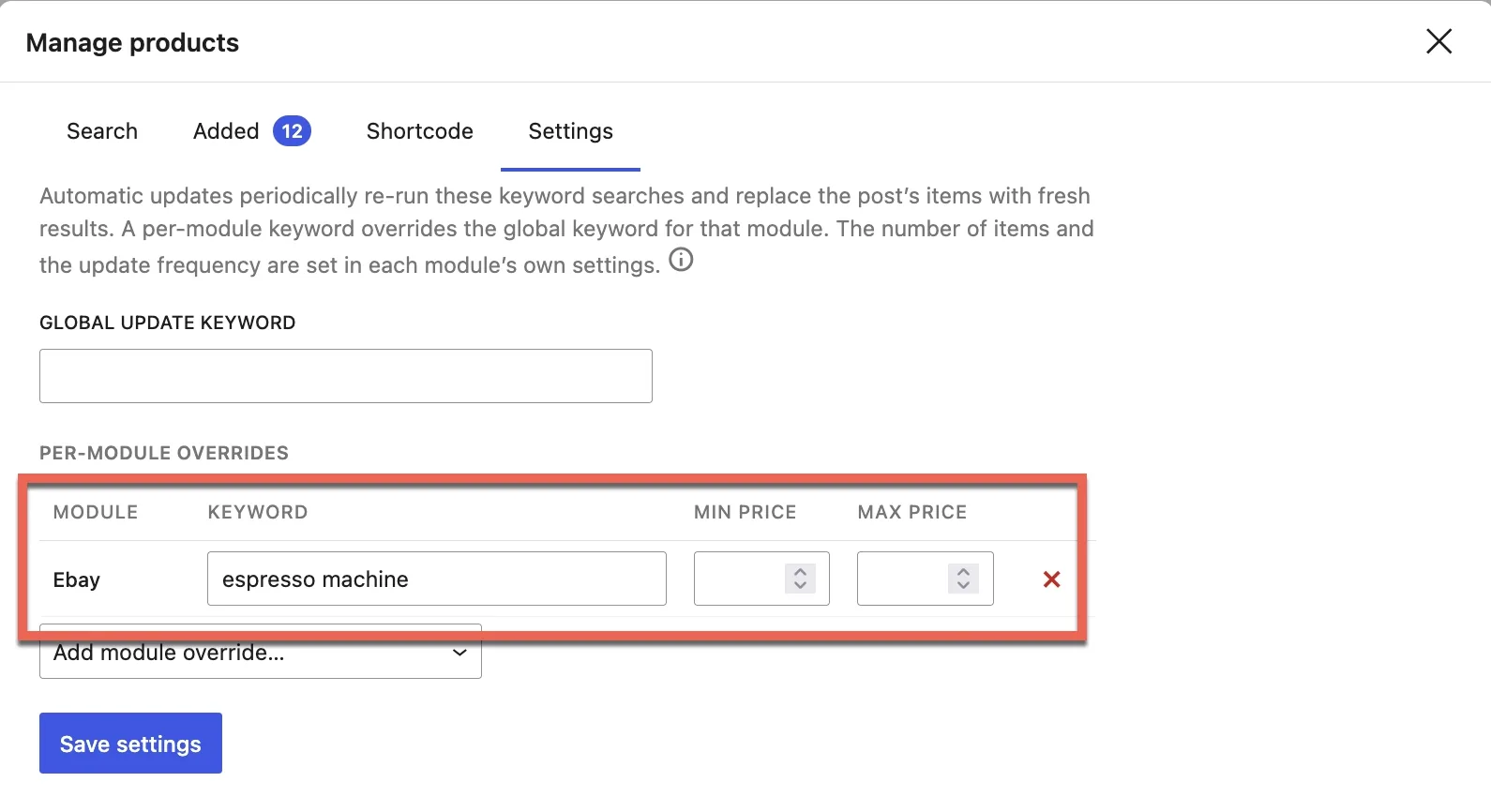
Pick a module under **Add module override…** and give it its own keyword. It replaces the global keyword for that module only — the field shows the global keyword as a placeholder, so you can always see what the module would otherwise search for.

Modules that support price filtering also accept **Min price** and **Max price**; the rest show `–`.

<figure><img src="/files/3mHzgn5YaIKprNHCgFMv" alt="A per-module override row on the Settings tab, with module, keyword, min price and max price"><figcaption><p>A per-module keyword wins over the global one — here Ebay updates on “espresso machine”</p></figcaption></figure>

Click **Save settings** when you're done. Removing a row — or clearing its keyword — drops the override, and that module goes back to the global keyword.

{% hint style="info" %}
**Coupons, images and videos** have no global keyword. For those families the section is called **Per-module keywords**, and each module updates on its own keyword only — so a product-topic keyword can't overwrite curated coupons or media.
{% endhint %}

### Several keywords at once

A keyword field takes a comma-separated list. Content Egg runs one search per keyword and merges the results into a single list — useful for a fixed set of products, or for [EAN/GTIN price comparison](/set-up-products/price-comparison-websites.md). The [group](/frontend/groups.md) syntax works here too:

```
keyword1,keyword2,keyword3 -> group1,group2,group3
```

## How many products, and how often

The keyword decides *what* is fetched. Each module's own settings decide *how many* and *how often* — open the module's settings page:

* **Results for updates** — how many products a single update pulls in.
* **Update by Keyword** — cache lifetime in seconds. Once it expires, the product list is fetched again with the keyword. `604800` is one week; `0` turns keyword updates off for that module.
* **Update Mode** — what triggers the update: **Page View**, **Cron Job**, or both. Cron runs in the background on WP-Cron, with nothing else to configure.

{% hint style="info" %}
If no new products are found — an API error, or a search that returns nothing — the existing products stay in place. A failed update never empties a post.
{% endhint %}

{% hint style="warning" %}
An update **replaces** that module's products on the post. Manual changes to those items — an edited title, a hand-written or AI-generated description — are lost when fresh results arrive. Keep automatic updates for posts you let the plugin own.
{% endhint %}